How to Build a Portfolio Website on WordPress Step by Step
A step-by-step blueprint for building a clean, fast, client-ready portfolio website on WordPress—focusing on proof-driven case studies, lean themes, and friction-free contact routing.

Virtual Assistant & Data Entry Specialist
Most freelancer portfolio websites fail for a simple reason: they look like art galleries filled with silent thumbnails instead of proof that you solve real business problems.
When a busy agency founder or store owner lands on your site, they want three answers within ten seconds: what exact problem do you solve, have you done it cleanly before, and how do they book or message you next?
I built my own early presence on WordPress before evolving into structured case studies and technical service pages.
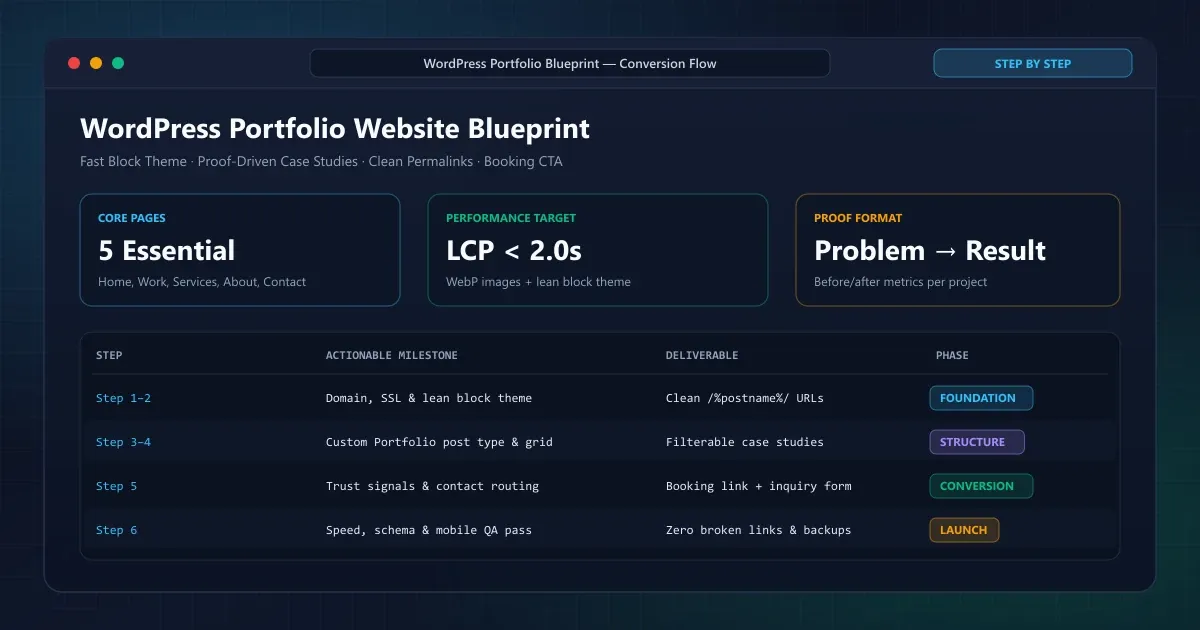
Here is the exact step-by-step process I recommend for building a fast, credible WordPress portfolio website without drowning in bloated templates.
Six-Step Portfolio Launch Flow
Step 1: Plan the Five Core Pages Before Opening WordPress
Never start by browsing theme demos—that leads to copying filler sections that do not match your service. Map your sitemap on paper first with five focused pages:
- Home: Clear one-line positioning statement, key proof metrics, top three services, two featured projects, and a direct CTA.
- Portfolio / Case Studies: Filterable grid of three to six real deliverables written in a Problem → Method → Result format.
- Services & Pricing: What is included, turnaround times, tools used, and starting rates or packages.
- About: Real photo, background credentials, workflow principles, and why clients trust you with their systems.
- Contact: Short inquiry form plus a direct scheduling link and clear response-time expectations.
Step 2: Set Up Hosting, SSL & Clean Permalinks
Install WordPress.org on reliable hosting, enable your free HTTPS certificate immediately using our WordPress free SSL setup guide, and apply these clean defaults right away:
- Delete default "Hello World" posts, "Sample Page," and unused starter themes so search engines never index demo junk.
- Open Settings → Permalinks and select Post name (
/%postname%/), matching the WordPress Permalinks standard. - Under Settings → Reading, set your custom Home page as the static front page once built.
If you are brand new to how WordPress files, themes, and database tables interact, skim our complete guide to learning WordPress before installing plugins.
Step 3: Pick a Fast, Lightweight Theme
Heavy multi-purpose themes ship megabytes of unused sliders and scripts that hurt mobile Core Web Vitals. Choose a clean block-ready theme from the official WordPress Theme Directory:
| Theme | Strength | Best Paired With |
|---|---|---|
| Kadence | Fast header builder, clean typography, strong free tier. | Kadence Blocks (free grid & tabs). |
| GeneratePress | Ultra-lightweight footprint (<30 KB CSS/JS). | GenerateBlocks for custom case-study cards. |
| Ollie / Frost | Modern Full Site Editing (FSE) block themes with zero bloat. | Native WordPress Block Editor. |
Step 4: Structure Portfolio Entries Like Case Studies
Instead of cramming ten screenshots onto one static page, organize your portfolio items as a dedicated Custom Post Type (via free Secure Custom Fields / ACF or a lightweight portfolio plugin) or clean child pages under /portfolio/.
Each portfolio item should follow a consistent, scannable template:
- Project Snapshot: Client industry (anonymized if under NDA), tools used, and timeline.
- The Bottleneck: Two sentences explaining what was broken or slow before you stepped in.
- The Execution: Three to five bullet points showing the workflow or technical steps you used.
- Measurable Outcome: Before-and-after comparison (rows cleaned, page speed gain, hours saved, or zero-error launch).
- Next-Step CTA: A direct button linking to your contact or discovery call page.
Step 5: Add Real Trust Signals & Simple Contact Routing
A portfolio only converts when a visitor feels safe reaching out. Include verified client testimonials (with context like marketplace order type or industry), an authentic headshot, and clear ways to reach you.
Pair a three-field contact form (Name, Email, Project Summary) with a direct calendar booking embed like Zcal or Calendly—and configure SMTP via WP Mail SMTP so form submissions never silently drop.
Step 6: Run a Pre-Launch Speed, Mobile & SEO Audit
Before sharing your portfolio URL on LinkedIn, Fiverr, or outreach emails, run through these final checks aligned with Google Core Web Vitals targets:
- Compress every screenshot and portrait to WebP and set explicit image dimensions so pages do not shift while loading.
- Test every navigation link, button, and form submission on a real phone screen—check that text stays readable without pinching or horizontal scrolling.
- Verify XML sitemap generation, clean page titles, meta descriptions under 160 characters, and OpenGraph social preview images.
- Schedule automated off-site backups and verify your site recovers cleanly from one test restore.
Copy-Ready Portfolio Case Study Template
Not sure how to write up past client work so it reads like business proof rather than vague filler? Copy this exact structure into each portfolio post:
Title: [Result Achieved] for [Client Industry / Store Type]
Snapshot: Timeline · Tools Used · Primary Deliverable

1. Starting Problem
   - What was broken, slow, or costing the client time?
   - Include a concrete baseline (e.g., 4,200 unmapped rows, 4.8s mobile load).

2. Execution Workflow
   - Step 1: Audit & staging backup
   - Step 2: Core cleanup / structural build
   - Step 3: QA verification checklist

3. Measurable Outcome
   - Clear before-and-after metrics without violating client NDAs.
   - Link directly to /contact for similar projects.
Notice that even if an old client project happened under an NDA, you can describe the industry ("US Apparel Store" or "UK B2B Agency") and focus on the workflow and verified outcome.
Five Mistakes That Quietly Hurt Freelancer Portfolios
When reviewing freelancer sites across WordPress marketplaces, the same five avoidable errors keep costing people inquiries:
- Leaving Dummy Theme Text Live: Forgetting to remove Lorem Ipsum blocks or leftover demo categories signals carelessness to detail-oriented buyers.
- Using Generic Stock Office Photos: Buyers hire a real person, not a glass skyscraper stock photo—one clear headshot outperforms five generic banners.
- Hiding Contact Behind Five Clicks: Every case study and service block should end with a clear button straight to your inquiry form or booking calendar.
- Broken Outbound Links to Old Client Sites: Clients occasionally redesign their sites. Always include screenshots and metrics on your own site rather than relying solely on external live URLs.
- Zero Schema & OpenGraph Metadata: Without clean social preview images and Person/Service metadata, links shared on LinkedIn or WhatsApp look bare and untrustworthy.
One more practical habit I recommend to every freelancer: include an authentic screenshot of the finished project on each case study.
Skip glossy browser frames or Figma mockups—capture a real screenshot directly on your phone at 390px wide.
Busy founders frequently review portfolios on mobile first. If your case study looks crisp on desktop yet cramped or cut off on mobile, they assume your client work breaks on mobile too.
Taking two minutes for real mobile screenshots has prevented more follow-up questions in my client calls than any visual layout tweak.
Choosing Hosting & Domain Names That Age Well
You do not need an expensive dedicated server for a freelancer portfolio, but avoid overloaded shared plans that throttle PHP workers and freeze WordPress Admin during edits.
Look for hosts running LiteSpeed or Nginx with NVMe storage, PHP 8.2+, and built-in staging clones so you can preview layout changes safely.
Pick a clean, memorable brand domain (such as your own name or studio handle), connect free Cloudflare DNS for fast global routing, and turn on daily automated offsite backups from day one so your portfolio work is never tied to one server.
Field Note: Why Proof Beats Pretty Mockups in Client Calls
When I first put my own portfolio online years ago, I made the same mistake almost every freelancer makes: I uploaded static screenshots of finished websites and listed generic tool names underneath.
Clients still showed up to discovery calls asking the exact same skeptical question: "How do I know you won't break our live product variations or miss our launch deadline?"
Everything changed the week I replaced screenshot galleries with a detailed before-and-after breakdown of how I sanitized and uploaded a 7,000+ SKU WooCommerce catalog.
Instead of claiming I was "fast and reliable," I showed the broken supplier CSV traps I fixed, my 8-point QA checklist, and the exact variation mapping steps that kept checkout error-free.
Prospects stopped negotiating my hourly rate and started sending sample spreadsheets on the very first message. That shift proved to me that operational specificity converts far better than visual polish alone.
Technical SEO Signals That Help Your Portfolio Rank
Beyond fast hosting and clean copy, I make sure every portfolio site I ship includes three quiet technical signals that search engines rely on:
- Person & Service Schema: Connect your name, profile photo, social profiles, and service pages using JSON-LD so search engines clearly link your portfolio to your marketplace profiles.
- Descriptive Image Alt Text: Name case-study screenshots clearly (for example,
woocommerce-sku-variation-table.webp) instead of leaving camera filenames likeIMG_4021.png. - Internal Links Between Guides & Work: Link every tutorial you publish back to the relevant case study and service page so visitors move smoothly from reading your advice to booking a call.
Once your portfolio is live and indexed, keep building topical depth with three or four practical tutorials tied directly to your services. That combination turns your WordPress portfolio from a static brochure into an evergreen inbound lead asset that compounds steadily over time.
Want a second pair of eyes on your CMS setup or need ongoing help updating WordPress pages, products, and spreadsheets? Book a free discovery call or review our WordPress and catalog operations packages.
Refreshing Proof Samples & Auditing Forms Every Quarter
Launching a crisp WordPress portfolio gets you into the race, yet small quarterly upkeep separates steady inbound inquiries from neglected brochure sites. Set a recurring calendar reminder once every ninety days to submit a test message through your contact form to confirm SMTP routing delivers cleanly, retire outdated tool screenshots, and swap in one fresh quantified case study highlighting recent client outcomes. Prospective buyers notice immediately when copyright years, live portfolio samples, and service rates feel current and carefully maintained.
Frequently Asked Questions
Common operational inquiries related to How to Build a Portfolio Website on WordPress Step by Step
Ready to Delegate Catalog, Spreadsheet & Admin Workflows Safely?
Onboard a specialist VA who writes clean SOPs, scopes access properly, and tracks hours transparently. Book a free 15-minute discovery call to start.

Written by Wp Hossain (Mikail Hossain)
Senior Catalog & E-Commerce Specialist with 7+ years handling multi-thousand-SKU WooCommerce, Shopify, and supplier CSV migrations (4.9/5 across 82 Fiverr reviews).