Where to Find the Best WordPress Designer: Freelancers, Agencies & What to Check
An honest comparison of where to hire a reliable WordPress designer or specialist—covering Fiverr, Upwork, WordPress job boards, agencies, red flags, and a pre-hire test task.

Virtual Assistant & Data Entry Specialist
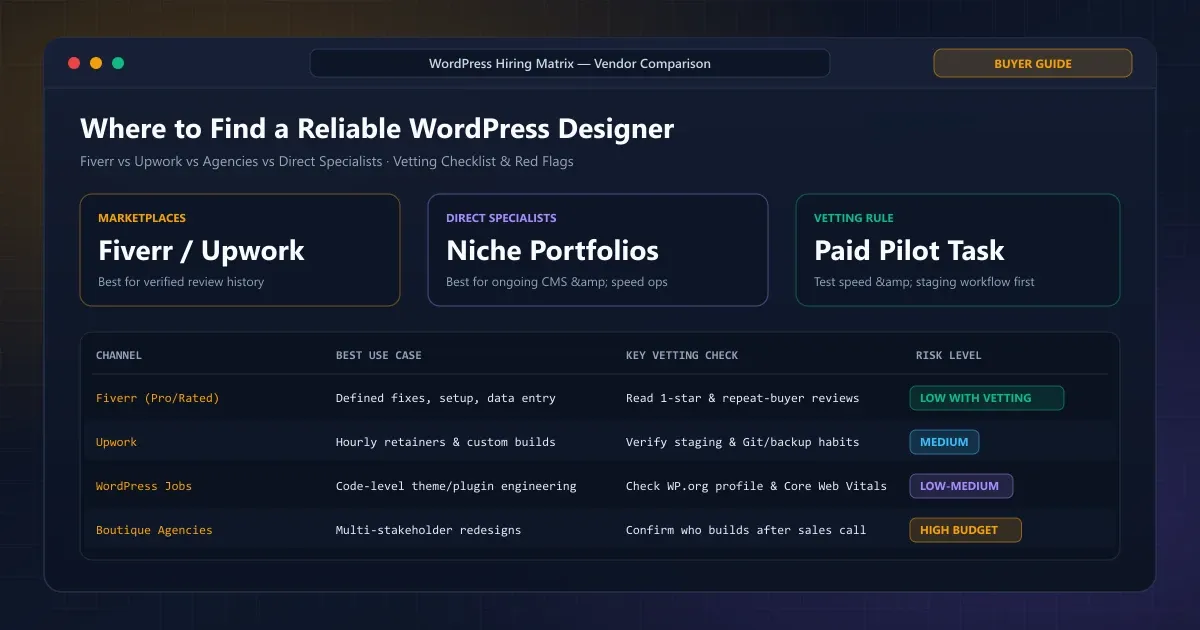
Finding someone who claims they "build WordPress sites" takes five minutes; finding someone who delivers a fast, maintainable site without leaving behind pirated plugins takes careful filtering.
Having worked on WordPress, WooCommerce, and CMS data projects since 2019 across Fiverr, Upwork, and direct client retainers, I have seen both sides of the hiring table.
Most disappointing projects happen not because good specialists do not exist, but because buyers pick the wrong platform for their project scope—or skip basic technical checks before handing over admin logins.
Here is an honest breakdown of the best places to find a WordPress designer or CMS specialist, what each channel is actually good for, and the exact vetting checklist I use.
Smart Hiring Funnel (Low Risk)
Comparing the Five Main Places to Find WordPress Talent
Different platforms attract very different types of WordPress talent. Matching your project size and budget to the right marketplace eliminates half the friction upfront.
| Platform | Best For | Pros | Watch Out For |
|---|---|---|---|
| Fiverr | Fixed-scope builds, landing pages, WooCommerce setup, CMS cleanup. | Clear packages, escrow protection, verified repeat-buyer history. | Ultra-cheap $25 gigs using bloated nulled themes. |
| Upwork | Hourly retainers, custom theme work, multi-week builds. | Time-tracked hourly billing, detailed work history & interviews. | Copy-paste agency proposals hiding junior subcontractors. |
| WordPress Jobs | Plugin engineering, custom PHP, block-theme architecture. | Attracts experienced WordPress contributors directly. | No built-in escrow; requires your own contract & milestone invoicing. |
| Direct Specialists | Ongoing CMS ops, speed, catalog migration & site reliability. | Direct communication with the exact person doing the work. | Verify real reviews, case studies, and domain ownership. |
| Boutique Agencies | Full brand identity + copywriting + multi-stakeholder redesigns. | Design, dev, and QA under one project manager. | High minimums and senior pitch vs. junior execution. |
If your project involves custom code or theme architecture rather than visual assembly, posting on the official WordPress Jobs board connects you directly with developers who follow WordPress Coding Standards.
Five Practical Checks Before You Hire Anyone
Do not judge a WordPress designer solely by pretty static screenshots on Behance or Dribbble. Run these five quick checks first:
- Inspect two live client websites on mobile: Tap through menus, check layout spacing on a real phone, and test whether pages feel snappy or sluggish.
- Run live portfolio URLs through PageSpeed Insights: Check their recent builds with Google PageSpeed Insights. Clean block sites pass Core Web Vitals easily; sloppy builds fail mobile LCP badly.
- Read the 3-star and repeat-buyer reviews: Five-star ratings are common, but repeat buyers and detailed reviews reveal whether the specialist communicates clearly when unexpected bugs pop up.
- Ask what theme and plugins they plan to use: A good specialist names their stack upfront (such as Kadence, GeneratePress, WooCommerce, Rank Math) and explains why.
- Confirm license ownership: Every paid theme or plugin license should be registered in your business name—never installed via "free agency lifetime" bundles that stop receiving security patches.
Five Red Flags That Predict a Messy Build
Walk away early if you hear any of these during your discovery chat:
- "I will give you Elementor Pro / Divi / WP Rocket free forever": Usually means cracked ("nulled") ZIP files or unlinked agency keys that expire or inject malware later.
- Asking for your hosting root password or master credit card: Professionals work inside scoped hosting collaborator invites or a staging WordPress admin account.
- No backup or staging plan: Editing live CSS or importing bulk products directly onto a live production store without a backup is reckless.
- Refusal to show live URLs: Only showing Figma images or cropped screenshots means they may not have shipped real production sites.
- Generic fixed quote before seeing your scope: Reliable specialists ask about page count, SKU volume, integrations, and content readiness before locking a price.
Use a Small Paid Pilot Before Committing Full Budget
Just as I advise in our guide to hiring a specialized virtual assistant, the safest way to vet a WordPress designer is a small, paid milestone.
For example, hire them to redesign your homepage hero or build one portfolio case-study template on staging before unlocking the full project.
Within 48 hours you will see how cleanly they structure blocks, optimize images, name files, and communicate updates—before risking a full site rebuild.
Copy-Ready Brief Template That Attracts Better Proposals
Vague job posts like "Need a WordPress website ASAP" attract automated spam bids. Sending a structured five-point brief immediately filters for organized professionals:
1. Business & Goal: [Who we are + what the site must make visitors do]
2. Page Count & Features: [e.g., 5 core pages + WooCommerce 200 SKUs + contact form]
3. Tech Preference: [Clean block theme like Kadence/GeneratePress, no bloated builders]
4. Reference Sites: [2 live URLs whose clarity/layout you like—and why]
5. Deliverables & Handover: [Staging URL, PageSpeed mobile 85+, clean backups, own licenses]
Notice how clearly this brief sets technical expectations upfront. Any candidate who replies with a generic template and ignores your theme or staging requirement can be disqualified in ten seconds.
Mandatory Handover Checklist Before Final Payment
Never mark a WordPress contract complete until these six items are verified inside your own accounts:
- Full Admin Ownership: Your business email is the primary Administrator, and temporary contractor accounts are removed or downgraded once launch QA passes.
- Verified Off-Site Backup: A clean export of both files and MySQL database sits safely inside your own Google Drive, S3 bucket, or host snapshot.
- Documented Plugin & License List: Every active plugin is listed with why it exists and which license key belongs to your company.
- SSL & Redirect Verification: Confirm HTTPS padlock works across every route and old legacy URLs return clean 301 redirects rather than 404 errors.
- Working Forms & Checkout Test: Submit a live test message through every form and verify the email lands in your primary inbox—not spam.
- Clean Core Web Vitals Baseline: Run a quick mobile check in PageSpeed Insights so you know the site is not shipping 8 MB uncompressed hero banners.
Realistic Budget & Timeline Benchmarks in 2026
Understanding fair market pricing prevents two costly mistakes: hiring the cheapest $40 bid that breaks in a month, or overpaying $8,000 for a simple five-page brochure site.
In practice, most clean WordPress projects fall into three clear tiers depending on complexity and data volume:
- Starter Business or Portfolio Site ($300 – $900 · 5 to 10 Days): Clean block theme setup, five core pages, SSL, basic SEO metadata, contact form with SMTP, and automated backups.
- Content Hub or Service Site ($900 – $2,200 · 2 to 3 Weeks): Custom post types for case studies, structured service pages, speed optimization, schema markup, and editorial templates.
- WooCommerce Store or Catalog Migration ($1,500 – $5,000+ · 3 to 6 Weeks): Theme setup plus bulk SKU cleanup, parent-child product variations, attribute filtering, payment gateways, and 301 URL redirects.
If your core website is already built and you mostly need reliable ongoing product uploads, spreadsheet cleanup, or CMS updates, hiring a specialized hourly operator at $13/hr to $25/hr is far more cost-effective than retaining a full-service agency.
Field Note: How I Spot Messy Handovers Before Fixing a Store
Several times a year, store owners hire me to clean up product catalogs or speed up WordPress sites right after a previous cheap redesign went wrong.
Within five minutes inside WordPress Admin, I can usually tell whether the original builder followed disciplined standards or took shortcuts.
On rushed builds, I immediately see three telltale signs: unlicensed "pro" plugins stuck on outdated versions, 5 MB PNG images uploaded straight from Canva without resizing, and custom CSS pasted haphazardly into four different theme panels.
Worst of all, the owner often does not even own the domain registrar or backup account—because everything stayed inside the departing contractor's personal dashboard.
You can avoid every one of those headaches before paying a single milestone simply by insisting on two things upfront: a small paid staging pilot and your mandatory handover checklist signed off in writing.
Four Questions to Ask on a 15-Minute Discovery Call
When I speak with prospective clients or help founders evaluate WordPress contractors, these four quick questions immediately separate seasoned operators from guesswork builders:
- "How do you handle staging and rollback if an update breaks checkout?" Listen for concrete staging workflows and automated offsite backups, not vague assurances.
- "Which theme and plugins will stay installed after launch?" You want a lean, well-supported stack rather than twenty overlapping third-party addons.
- "How will you optimize images and fonts for mobile Core Web Vitals?" Good builders mention WebP compression, lazy loading, and minimal render-blocking scripts right away.
- "Will every license key and admin account sit under our company email?" Any hesitation here is an immediate sign to keep looking.
Looking for reliable help with WordPress setup, WooCommerce product uploads, or ongoing CMS data maintenance at a transparent hourly rate? Review our services & $13/hr pricing or book a free 30-minute discovery call to walk through your scope together.
Structuring Fair Milestone Reviews & Post-Launch Support Expectations
Unclear payment triggers derail more WordPress engagements than technical complexity ever does. Never release final project milestones purely because desktop mockups look polished in Figma or on an agency staging domain; tie the concluding payment strictly to a live production launch where responsive mobile breakpoints, transactional contact forms, backup schedules, SEO permalinks, and Core Web Vitals baselines all pass verification together.
During proposal comparison, ask each candidate explicitly what thirty days of post-launch warranty covers versus recurring maintenance retainers. Reliable freelancers clearly include fixing broken layout regressions, plugin conflicts introduced during launch, and form routing glitches at zero additional cost while quoting transparent hourly rates for future feature additions, catalog uploads, or seasonal landing page updates. Writing those exact expectations down before signing keeps both client and builder aligned smoothly from wireframe approval through post-launch handoff.
Frequently Asked Questions
Common operational inquiries related to Where to Find the Best WordPress Designer: Freelancers, Agencies & What to Check
Ready to Delegate Catalog, Spreadsheet & Admin Workflows Safely?
Onboard a specialist VA who writes clean SOPs, scopes access properly, and tracks hours transparently. Book a free 15-minute discovery call to start.

Written by Wp Hossain (Mikail Hossain)
Senior Catalog & E-Commerce Specialist with 7+ years handling multi-thousand-SKU WooCommerce, Shopify, and supplier CSV migrations (4.9/5 across 82 Fiverr reviews).