Regex for Beginners: The 12 Patterns That Handle Most Data Cleanup
Most people learn regex by reading a syntax reference, getting overwhelmed, and giving up. This is the other path: twelve patterns you actually need, explained with the problem each one solves.

Virtual Assistant & Data Entry Specialist
The first time I tried to learn regex I read a reference page that opened with a discussion of atomic groups and possessive quantifiers. I closed the tab and did not come back for a year.
That was the wrong entry point. Regex becomes useful almost immediately if you learn it as a set of solutions to problems you already have, and almost never useful if you learn it as a grammar.
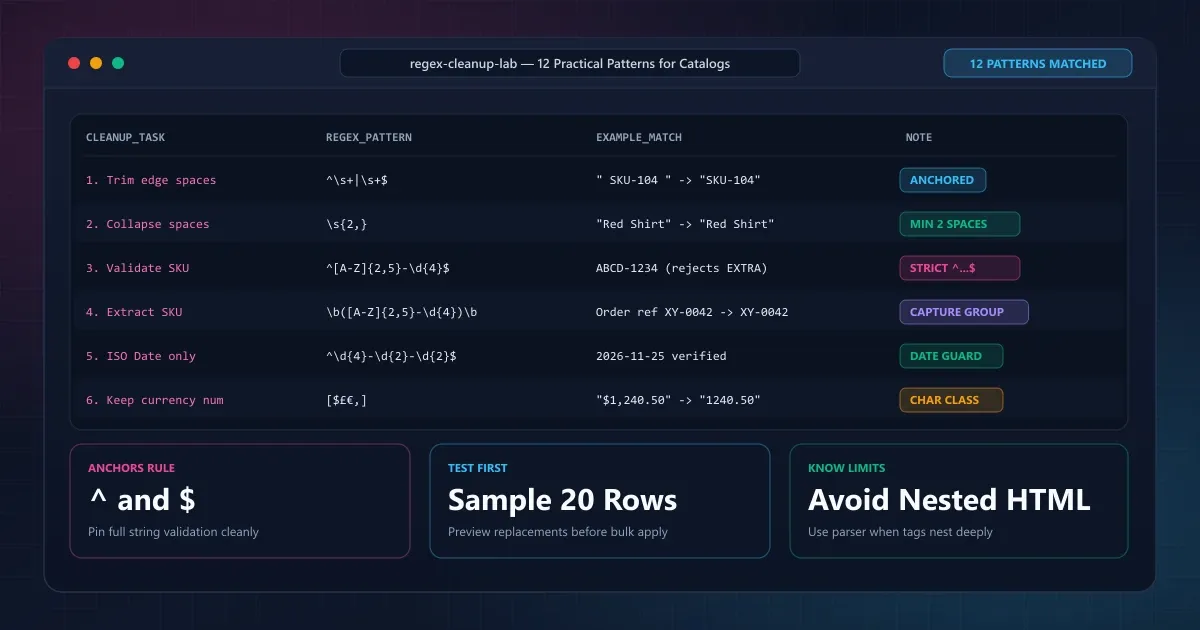
Here are twelve patterns. Each one solves a problem I have actually hit in catalog work, spreadsheet cleanup, or log parsing, and each comes with an explanation of why it works so you can adapt it.
The four things you need before the patterns
You need to know these four facts. That is genuinely the whole prerequisite.
Characters match themselves. The pattern cat matches the literal text cat.
Classes in square brackets match one character from a set. [abc] matches a, b, or c. [0-9] matches any single digit. [a-z] matches any lowercase letter.
Quantifiers repeat the previous thing. + means one or more. * means zero or more. ? means optional. {3} means exactly three.
Anchors pin the match to a position. ^ means start of the string, $ means end. Without anchors a pattern matches anywhere inside the text, which is often not what you want.
Everything else you can look up as you need it. Now the patterns.
1. Trim stray whitespace properly
^\s+|\s+$The problem: a spreadsheet column where some values have leading or trailing spaces, causing lookups to fail even though the values look identical.
Why this works: ^\s+ matches whitespace at the start, |\s+$ means "or whitespace at the end." The + makes it consume the whole run rather than one character, so repeated replacements are not needed.
Caveat that will save you an afternoon: \s in most engines does not match a non-breaking space, which is the character that arrives when someone copies from a web page.
If trimming does not work and the values still look identical, search explicitly for the non-breaking space character, not for \s.
2. Collapse repeated whitespace
\s{2,} → replace with a single spaceProduct descriptions that have been through three copy-paste cycles accumulate double and triple spaces. This normalises them to one.
The {2,} matters. Using a bare \s+ with a single-space replacement also works, but writing the minimum at two makes the intent explicit and avoids touching single spaces unnecessarily in some editors.
3. Validate a SKU format
^[A-Z]{2,5}-\d{4}$
This matches a code like ABCD-1234 or XY-0042 and nothing else.
Breaking it down: ^ start, [A-Z]{2,5} two to five capital letters, a literal hyphen, \d{4} exactly four digits, $ end.
The anchors are the important part. Without them, ABCD-1234-EXTRA would also match, because the pattern would just find ABCD-1234 somewhere inside it. Anchors mean "the whole value must be this," which is what validation needs.
4. Extract a SKU from a longer string
\b([A-Z]{2,5}-\d{4})\bDifferent from the previous pattern. Here you want to find the SKU inside text like "Order for ABCD-1234 (red variant)". The anchors are gone because you want a search rather than a validation.
The \b is a word boundary. It prevents matching inside a longer alphanumeric run, which is a subtle bug: without it, XABCD-1234 would match the inner part.
The capturing parentheses around the SKU mean that in most tools, the matched group is available separately from the full match. That is what you put into your spreadsheet column.
5. Match an ISO date only
^\d{4}-\d{2}-\d{2}$
Useful for finding date cells that are not in the format you require. It will match 2026-13-45 as well, because regex has no concept of whether the month is real.
That limitation is fine. The purpose of this check is to find values that are wrong in shape, and the shape check catches the common case where someone typed 14/03/2026 or March 14.
Real semantic validation happens afterwards when you parse the date and see if it errors.
6. Strip a currency symbol but keep the number
[£$€¥]Replace with an empty string. This handles the common case where a price column has a symbol prepended.
What this does not handle is the harder version: thousands separators that might be commas or dots. 1,234.56 and 1.234,56 both exist in the wild, and no single regex resolves the ambiguity because the same string can mean different things depending on locale.
My advice: use this pattern to remove symbols, then handle separators with explicit locale logic rather than regex. A regex that guesses will silently produce numbers off by a factor of a thousand.
7. Find duplicate spaces around punctuation
\s+([,.;:!?])
Replace with $1, which is the captured punctuation and nothing else. This turns "Widget , Large" into "Widget, Large".
The $1 backreference is the piece that makes this useful. Without it you would delete the punctuation along with the space.
8. Split a full name into first and last
^(\S+)\s+(.*)$Group one is everything up to the first space. Group two is everything after.
This works for most Western name formats and it is wrong for a lot of others, which is a legitimate problem rather than a regex problem.
Names with particles ("van der Berg"), single names, and cultures where the family name comes first all break the assumption.
Use it for splitting where approximate is acceptable. Do not use it as a data model decision.
9. Match a URL
https?://[^\s<>"]+Matches http or https, then one or more characters that are not whitespace, angle brackets, or quotes.
Notice what I am not doing: I am not trying to validate a URL. Full URL validation by regex is a famous trap, because the specification allows an enormous range of forms.
This pattern extracts something that looks like a URL from a block of text, which is a much more reasonable goal.
If you need validation, parse the URL with your language's URL library and catch the error. That is both shorter and correct.
10. Find empty or whitespace-only cells
^\s*$Matches a string that is empty or contains only whitespace. Use it to find required fields that are technically filled but practically blank.
This catches a category of data problem that blank-cell checks miss entirely. A cell with a single space is not blank to a spreadsheet filter, but it is blank to a human and to your importer.
11. Extract numbers from mixed text
-?\d+(?:\.\d+)?Finds a number, optionally negative, optionally with a decimal part.
The (?:...) is a non-capturing group. It groups the decimal part for the ? to apply to, without creating an extra capture group you do not want.
If your text says "ships in 5-7 days", this finds 5 and 7 as separate matches, which is usually right but worth knowing. If your text says "SKU 12-34", it also finds 12 and 34, which is usually wrong.
Always test against the messy end of your real data rather than the clean sample.
12. Case-insensitive contains
(?i)refurbish
The (?i) flag makes the rest of the pattern case-insensitive, so this matches "Refurbished", "REFURBISHED", and "refurbished".
Most tools also offer a checkbox for this rather than an inline flag, which is easier to remember. The inline form is useful when you are writing patterns in code where there is no checkbox.
The one concept that trips everybody up
Greedy versus lazy matching causes more confusion than everything else combined.
Given the string start-middle-end and the pattern start(.*)end, the group captures -middle-. That is greedy: it takes as much as possible while still letting the rest of the pattern match.
Given start-middle-end and start(.*?)end, the group captures -middle- as well, because there is only one end. The difference appears with repeated delimiters.
Take <p>first</p><p>second</p> with the pattern <p>(.*)</p>. Greedy captures first</p><p>second, swallowing both paragraphs as one. Making it lazy, <p>(.*?)</p>, captures first and then second separately.
This is exactly the bug that makes people write regex-based HTML parsers and then discover they have mangled the document. The correct answer for HTML is not a lazy quantifier, it is a parser.
Regex stopping at the first closing tag is a reasonable tool for a one-off extraction; it is not a parsing strategy.
Test before you apply
Every regex tool worth using has a test pane where you paste sample text and watch matches highlight as you type. Use it with real data, not a clean example you invented.
Specifically, paste in the worst rows from your actual file. The row with the emoji, the row with the accented name, the row where someone typed a note in the middle of a number.
Those are the rows that decide whether your pattern is correct, and they never appear in tutorials.
If your tool does not have a test pane, write a five-line script that applies the pattern to a small sample and prints the result. Faster than running it against the whole file and inspecting the damage.
When not to use regex
HTML and JSON. Always. Use a parser.
CSV with quoted fields containing commas or newlines. A regex split on commas will break; use a CSV library.
Anything where the pattern would need to handle nesting, like balanced brackets. Regex cannot count, and attempts to work around that produce patterns nobody can maintain.
And anything where a simpler string operation works. If you need to check whether a value starts with "SKU", startsWith is faster, clearer, and cannot be wrong. Regex is for patterns, not for every string test.
How to get better at this
Take one cleanup task you do manually every week, and write a pattern for it. One task, one pattern. When it works, the next one takes half the time.
That is the entire learning method. Twelve patterns in, you will find yourself reaching for it unprompted, which is the point at which a tool has actually been learned.
Official regex references and next steps
Keep the MDN Regular Expressions Guide and the Python Regex HOWTO bookmarked when switching between browser scripts and Python pipelines.
Apply these 12 expressions inside OpenRefine catalog sanitization or a repeatable pandas supplier cleaning pipeline.
Frequently Asked Questions
Common operational inquiries related to Regex for Beginners: The 12 Patterns That Handle Most Data Cleanup
Need a Resilient Scraper or Clean B2B Directory Dataset?
Skip brittle point-and-click exports. Book a complimentary 15-minute scoping call to evaluate target sources, compliance rules, and clean CSV/API delivery.

Written by Wp Hossain (Mikail Hossain)
Senior Data Extraction Specialist with 7+ years delivering Playwright crawlers, REST payload interceptors, and GDPR/robots-compliant public datasets (4.9/5 across 82 Fiverr reviews).