Cleaning Messy Supplier Data with Python and Pandas: A Working Recipe
Supplier files are never clean. Here is the pandas workflow I run on every incoming catalog: what to check first, which operations are safe, and the three cleaning steps that cause more damage than they fix.

Virtual Assistant & Data Entry Specialist
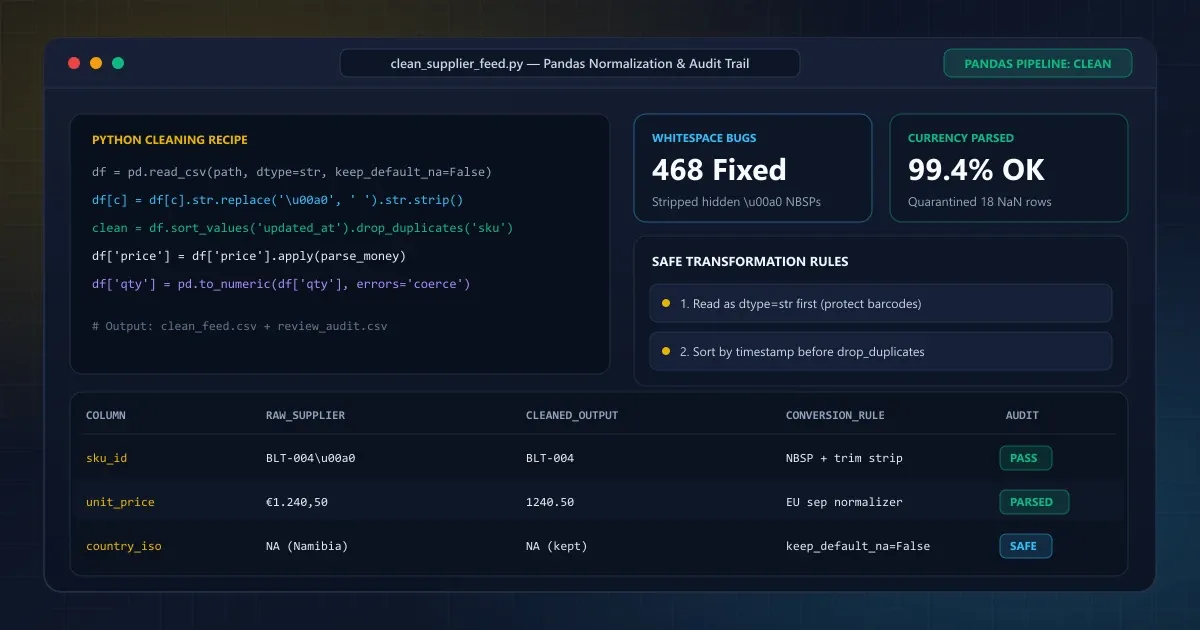
Every supplier spreadsheet arrives with a personality. One sends prices as text with a currency symbol. Another sends the same SKU twice with different prices and no indication which is current.
A third has merged cells in the header row, which means the CSV export has column names in row three and blank cells everywhere else.
I have cleaned a few hundred of these. Early on I wrote enthusiastic cleaning scripts that applied twenty transformations in sequence and produced a beautiful, wrong output.
Now I do it differently: inspect first, then a small number of targeted fixes, then a validation report I actually read.
This is that workflow, with the code I use.
Look before you clean
The most expensive mistake in data cleaning is applying a transformation to a column you have not looked at. So the first step is always inspection, and it never gets skipped, no matter how small the file.
import pandas as pd

df = pd.read_csv('supplier_feed.csv', dtype=str, keep_default_na=False)

print(df.shape)
print(df.columns.tolist())
print(df.head(10).to_string())
Two choices in that read call deserve explanation because they are the difference between a reliable pipeline and a mystery.
dtype=str loads everything as text. This prevents pandas from guessing that 00412 is the number 412, and from turning a twenty-digit barcode into 1.23457e+19. Every value stays exactly as it appeared in the file.
You convert types deliberately later, when you know what they should be.
keep_default_na=False stops pandas from converting the strings "NA", "N/A", "null", and "None" into missing values. This matters more than it sounds: a country column legitimately containing the value "NA" (Namibia) becomes empty data.
It is a real bug I have shipped and then debugged at midnight.
Profile each column before touching it
for col in df.columns:
    s = df[col]
    blanks = (s.str.strip() == '').sum()
    uniq = s.nunique(dropna=False)
    print(f'{col!r:28} blanks={blanks:6} unique={uniq:6} sample={s.iloc[0][:40]!r}')
This prints the three facts that determine your cleaning plan: how much is missing, how much is repeated, and what a typical value looks like. A column with 4,000 unique values out of 4,000 rows is an identifier.
A column with eleven unique values is a category. That distinction changes everything downstream.
Whitespace is the number one killer
Invisible characters break more joins than any other single cause. A SKU that looks identical on screen can differ by a trailing space, a leading tab, or a non-breaking space pasted in from a web page.
# Normalise whitespace across all text columns
for col in df.columns:
    df[col] = (
        df[col]
        .str.replace('\u00a0', ' ', regex=False)   # non-breaking space
        .str.replace('\u200b', '', regex=False)    # zero-width space
        .str.strip()
    )
The non-breaking space, \u00a0, is the sneaky one. It looks exactly like a normal space and survives most trim functions. If you ever have two values that appear identical and a lookup still fails, this is the first thing to test.
How to confirm you fixed it
Compare uniqueness before and after. If a column had 3,880 unique values in 4,000 rows and cleaning the whitespace drops that to 3,412, you just found 468 rows that were duplicates disguised by invisible characters.
Deduplication, which needs a decision not a line of code
drop_duplicates() is one line and it is usually wrong, because it keeps the first occurrence and "first" depends on file order, which depends on how the supplier exported it.
The question you have to answer first: when the same SKU appears twice with different values, which row is true? Options in order of reliability.
By timestamp. If there is an updated-at or received-at column, keep the newest. This is the only method that is actually correct.
By completeness. Keep the row with the fewest blanks. Reasonable when a second delivery fills in missing fields.
By business rule. Keep the lowest cost, or the highest, depending on what the file represents. Document the rule because the next person will assume the opposite.
# Keep the most recently updated row per SKU
df['updated_at'] = pd.to_datetime(df['updated_at'], errors='coerce')

clean = (
    df.sort_values('updated_at')
      .drop_duplicates(subset='sku', keep='last')
)

print(f'{len(df)} -> {len(clean)} rows ({len(df) - len(clean)} duplicates removed)')
Always print the counts. A deduplication that removes half your rows is not a success, it is a signal that the SKU column contains something other than SKUs, possibly a category code that repeats.
Parsing dirty money columns
Prices arrive as $12.99, 12,99, 12.99 USD, £12.99, and occasionally 12.99* with a footnote asterisk. A naive astype(float) raises an error on the first row, which is at least honest.
A naive regex that strips everything except digits and dots will happily turn 12,99 into 1299.
def parse_money(value, decimal_sep='.'):
    if pd.isna(value):
        return pd.NA
    s = str(value).strip()
    s = s.replace('$', '').replace('£', '').replace('€', '')
    s = s.replace('USD', '').replace('GBP', '').replace('EUR', '').strip()
    s = s.replace('*', '').strip()

    if decimal_sep == ',':
        # European style: 1.234,56
        s = s.replace('.', '').replace(',', '.')
    else:
        # Anglo style: 1,234.56
        s = s.replace(',', '')

    try:
        return float(s)
    except ValueError:
        return pd.NA

df['price'] = df['price'].map(lambda v: parse_money(v, decimal_sep='.'))
The decimal_sep parameter is the whole ballgame. A German supplier sending 1.234,56 and an American supplier sending 1,234.56 look similar to a careless parser and produce results two orders of magnitude apart.
Ask the supplier which convention they use, or infer it from a value with three decimal places.
Always check what the parse did
parsed = df['price'].notna().sum()
total = len(df)
print(f'parsed {parsed}/{total} prices')

# Look at rows that became NaN
print(df[df['price'].isna()]['price_raw'].head(20).tolist())
If 300 prices failed to parse, the raw values tell you the new pattern within seconds. Skipping this check means 300 products silently have no price, which at least surfaces as a zero on the storefront rather than a wrong number.
The zeros get noticed eventually. The wrong numbers do not.
Matching supplier names to your catalog
Supplier product names are not your product names. "Stainless Steel Water Bottle 500ML" and "SS Water Bottle - 500ml - Silver" are the same item and no exact match will find it.
Do not solve this with fuzzy matching first. Solve it with the SKU. If the supplier includes your SKU anywhere, even in a combined field, extract it and join on that. It is exact and instant.
Only when there is no SKU do you fall back to name matching, and then you should look at a similarity score and set a threshold you review by hand for anything in the grey zone.
from difflib import SequenceMatcher

def similar(a, b):
    return SequenceMatcher(None, a.lower(), b.lower()).ratio()

# For a supplier with no SKU column:
candidates = []
for _, row in supplier.iterrows():
    scored = [
        (similar(row['name'], cat['name']), cat['sku'])
        for _, cat in catalog.iterrows()
    ]
    best_score, best_sku = max(scored)
    candidates.append({
        'supplier_name': row['name'],
        'matched_sku': best_sku if best_score > 0.86 else None,
        'score': round(best_score, 3),
    })

review = pd.DataFrame(candidates)
print(review[review['matched_sku'].isna()].head(30))
The 0.86 threshold is a judgement call, not a law. Low enough to catch real matches with word-order differences, high enough to reject most false positives. Anything below it goes to a human.
That review list is usually small and it is where the actual errors live.
This is also quadratic in the number of rows. Fine for a few hundred, painfully slow for fifty thousand. If you get there, block candidates by first letter or by token overlap before scoring.
Type conversion, at the end
Once the text is clean, convert deliberately and record what failed.
df['qty'] = pd.to_numeric(df['qty'], errors='coerce').astype('Int64')
df['price'] = pd.to_numeric(df['price'], errors='coerce')
df['updated_at'] = pd.to_datetime(df['updated_at'], errors='coerce')

report = {
    'rows': len(df),
    'qty_missing': int(df['qty'].isna().sum()),
    'price_missing': int(df['price'].isna().sum()),
    'date_missing': int(df['updated_at'].isna().sum()),
    'negative_qty': int((df['qty'] < 0).sum()),
    'zero_price': int((df['price'] == 0).sum()),
}
print(report)
Int64 with a capital I is the nullable integer type. The lowercase int64 cannot hold missing values and will either error or quietly cast your column to float, which then displays quantities as 48.0 and confuses everyone downstream.
The negative quantity and zero price checks catch the interesting rows. Some suppliers use negative quantity to indicate a discontinued item. Some use zero price to mean "ask us." Both are conventions you need to learn before you filter them out.
Three cleaning steps that do more harm than good
Do not auto-fill missing values without a rule
Filling blank prices with the category average creates products priced at numbers nobody chose. Filling missing categories with "General" hides the fact that the supplier did not categorise them. Missing data is information. Record it, flag it, and let a human decide.
Do not blanket title-case product names
Applying .str.title() to a product name list turns iPhone 15 Pro into Iphone 15 Pro and USB-C to HDMI into Usb-C To Hdmi. Brand names and acronyms break.
If you need consistent casing, apply it to the columns where you own the vocabulary, not to product data.
Do not strip all punctuation from identifiers
Cleaning AB-12/3 to AB123 as part of "tidying" destroys the SKU. Identifiers should be preserved exactly, including hyphens, slashes, and dots, because somewhere a system depends on them.
Saving output you can trust
# Write a clean file plus an audit trail of what changed
clean.to_csv('clean_feed.csv', index=False, encoding='utf-8-sig')
review.to_csv('review_matches.csv', index=False)

with open('cleaning_log.txt', 'w') as fh:
    for k, v in report.items():
        fh.write(f'{k}: {v}\n')
utf-8-sig writes a byte order mark, which makes Excel open the file with correct character rendering. Use it for anything a person will double-click.
Use plain utf-8 for anything a script or database will consume, because some loaders treat the BOM as part of the first column name.
Wrap it in a function and stop rewriting it
The first time you clean a supplier file it takes two hours. The second time, if you did not save the code, it takes two hours again.
Save it as a function with the supplier name as an argument, and the third supplier costs fifteen minutes.
def clean_supplier_feed(path, supplier, decimal_sep='.'):
    df = pd.read_csv(path, dtype=str, keep_default_na=False)
    df = normalise_whitespace(df)
    df['price'] = df['price'].map(lambda v: parse_money(v, decimal_sep))
    df = dedupe_by_updated(df)
    report = build_report(df)
    clean_path = f'clean_{supplier}.csv'
    df.to_csv(clean_path, index=False, encoding='utf-8-sig')
    return df, report
One function per supplier is fine. Do not over-abstract. Two suppliers with slightly different column names do not need a configuration system; they need two small functions and a comment saying which supplier each one handles.
Handling missing values without guessing
Once the types are right, you will have a count of blanks per column, and that count drives a decision you have to make explicitly rather than by accident.
There are four legitimate responses to a missing value, and the one you pick should depend on whether the field is essential to selling the product.
Reject the row. For a missing SKU or a missing price, the row cannot be sold as-is. Drop it and log it, because the supplier needs to know which rows they failed to complete.
Flag and keep. For a missing description or a missing weight, the product can still go live with an incomplete listing. Keep the row, mark the gap, and let a person fill it in before launch.
Derive it. If a category is missing but a reliable keyword appears in the product name, you can assign the category with a documented rule. Derivation is fine as long as the rule is written down and reviewable, not buried in a script.
Ask the supplier. Genuinely the best option for anything important, and the one people skip because it takes a day to get a reply.
essential = ['sku', 'price', 'qty']
blocked = df[df[essential].isna().any(axis=1)]
publishable = df.drop(blocked.index)

print(f'{len(blocked)} rows blocked, {len(publishable)} publishable')
blocked.to_csv('blocked_rows.csv', index=False)
Splitting the file into "publishable" and "blocked" rather than dropping rows outright is the detail that matters.
The blocked file is the artefact you send back to the supplier, and it turns an argument about data quality into a concrete list of nine rows they can fix in five minutes.
Making the pipeline safe to rerun
Supplier files arrive weekly and the same script runs each time. The failure mode that eventually bites is a rerun against a file that was already processed, or a partial run interrupted halfway through.
Two cheap habits prevent it. First, write outputs to a path that includes the input filename and a timestamp, so a rerun never overwrites a previous result. Second, keep the raw input untouched and never write to the file you read from.
A pipeline that mutates its own input is one interrupted run away from unrecoverable.
If the run is long enough that interruption is realistic, write to a temporary file and rename it on success.
A .part file that still exists tells you the run did not finish, which is a much clearer signal than a half-written CSV that looks plausible.
What this actually buys you
The output of this workflow is not a beautiful dataset. It is a dataset plus a report that says what was ambiguous, what failed to parse, and which rows a human should look at.
That second part is the useful part. Clean data with an unread report is how you ship a catalog where 40 products have no price and nobody notices for three weeks.
Pandas references and catalog guides
Double-check flags in the pandas read_csv documentation and the to_datetime parser reference before pushing new supplier mappings live.
For non-code visual clustering and regex matching, explore our OpenRefine catalog sanitization playbook and 12 beginner regex patterns.
Frequently Asked Questions
Common operational inquiries related to Cleaning Messy Supplier Data with Python and Pandas: A Working Recipe
Need High-Volume WooCommerce or Shopify Catalog Migration?
Eliminate broken variation CSVs and mismatched attributes. Schedule a free 15-minute call to review SKU counts, taxonomy structure, and bulk import timelines.

Written by Wp Hossain (Mikail Hossain)
Senior Catalog & E-Commerce Specialist with 7+ years handling multi-thousand-SKU WooCommerce, Shopify, and supplier CSV migrations (4.9/5 across 82 Fiverr reviews).