OCR for Invoice and Receipt Data Entry: What Actually Works in 2026
OCR vendors promise 99 percent accuracy. What they mean is 99 percent character accuracy, which is not the same as 99 percent correct invoices. Here is how to build an invoice pipeline that survives the difference.

Virtual Assistant & Data Entry Specialist
A bookkeeping firm asked me to look at their invoice process. They had bought an OCR tool, run nine hundred invoices through it, and discovered that roughly seventy had errors serious enough to matter. Two had the wrong vendor.
One had a total that was off by a factor of ten.
The tool was fine. The pipeline around it was missing the one thing that makes OCR usable: a validation layer that knows which fields are dangerous and checks them specifically.
This is about that layer, and about the honest limits of OCR on real invoices rather than the clean samples vendors demo.
Where OCR genuinely works
Modern OCR handles text extraction on a clean scan about as well as a human, and faster. That is real and worth using.
Printed invoices from a PDF with an embedded text layer are effectively perfect, because there is no OCR happening at all; the text is already there and just needs mapping to fields.
If your suppliers send proper PDFs, you are in the easy case and much of this article does not apply.
Scanned paper at 300 dots per inch or better, flat, with a standard font, is also reliable for the block of text. Header lines, invoice numbers, dates, and line item descriptions all extract cleanly in my experience roughly ninety-something percent of the time.
Where OCR actually fails
The failures are consistent enough to name, and knowing them tells you what to check.
Confusable characters in numeric fields
Zero and the letter O. One, lowercase l, and capital I. Five and S. Eight and B.
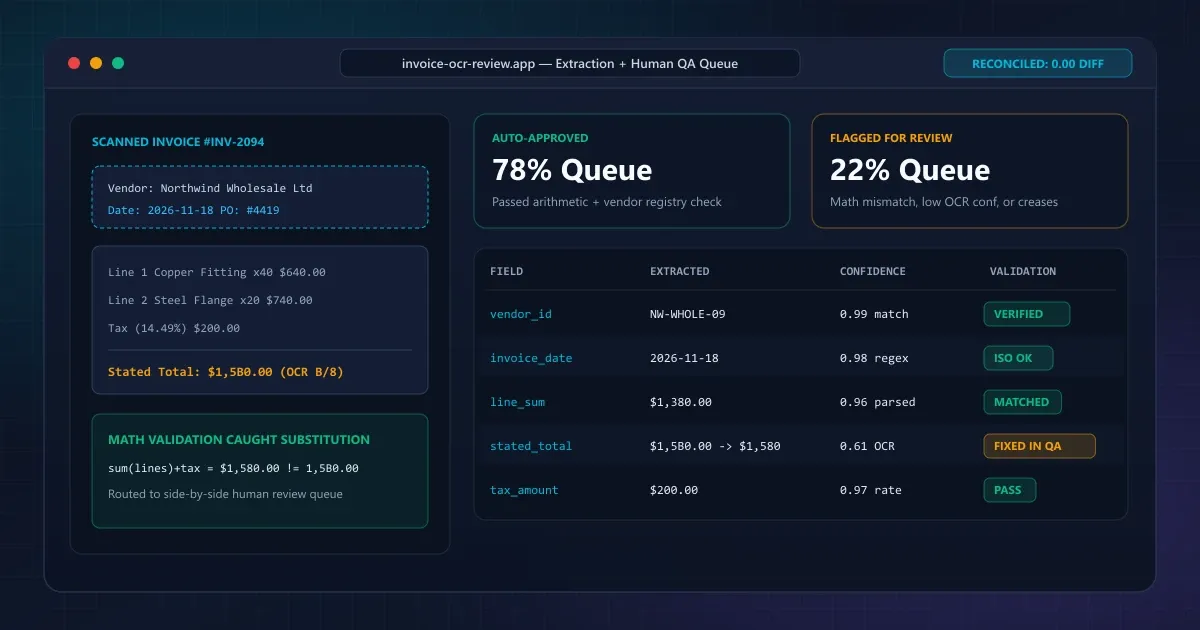
On an invoice total, one substitution turns 1,580.00 into 1,5B0.00 which the parser rejects, or into 1580.00 with a missing digit which it accepts.
This is exactly why numeric totals need validation, not just extraction. A total that does not equal the sum of line items plus tax is a signal, and it catches the class substitution reliably.
Line item tables
OCR reads a table as text with whitespace. It does not know that the third column is quantity. If one row has a description that wraps to two lines, the alignment shifts and quantities get attached to the wrong item.
This is the single biggest source of line-item errors in my experience. A wrapped description or a long product name pushing the columns visually out of line breaks the row reconstruction even though every character was read correctly.
Handwriting
Mostly not solved. Block capitals at a reasonable size have improved a lot. Cursive on a delivery note photographed at an angle in poor light still fails more often than it works.
If your process involves handwritten delivery receipts, do not automate that part. Photograph them for the record, extract nothing, and have a person type the four relevant fields.
Phone photos at an angle
A receipt photographed on a kitchen counter with a shadow across the total will fail on that line specifically. Perspective distortion plus uneven lighting is a bad combination, and the failure is local: nine lines read fine and one is garbage.
If you are collecting receipts from employees, give them a two-line instruction: flat on a plain surface, direct overhead light, include the whole receipt. That instruction alone meaningfully improves results and costs nothing to implement.
Multiple currencies and unusual layouts
An invoice with amounts in two currencies where only one is labelled will produce a total that mixes them. A layout where the total appears before the line items, which does happen with some European templates, can break a parser that assumes reading order.
What accuracy numbers actually mean
When a vendor says 99 percent accuracy, ask what unit. Character accuracy at 99 percent on a 600-character invoice means, on average, six wrong characters per page. Most are harmless. One might not be.
Field accuracy is the number that matters. If you extract vendor, date, total, tax, and invoice number, and each field has 98 percent accuracy independently, the chance that all five are correct on a given invoice is roughly 90 percent.
That means one in ten invoices needs human review, which is a very different business case from the one the vendor described.
Those numbers are illustrative rather than measured, but the arithmetic is the point. Per-field accuracy compounds, and the compounding is where budgets go wrong.
The validation layer that makes OCR usable
This is the part that matters. Extraction is the easy half. Validation is what turns extracted text into data you can post to an accounting system.
Check one: does the arithmetic reconcile
Sum the line items, add tax, subtract any discount, compare to the stated total. Allow a tolerance of a couple of cents for rounding.
A mismatch means something is wrong, either in extraction or in the document itself, and either way a person needs to look.
expected = sum(line_amounts) + tax - discount
diff = abs(expected - stated_total)

if diff > 0.02:
    flag(invoice, 'total_does_not_reconcile', diff)
This single check catches the digit-substitution class of error almost completely, because a wrong digit in a total almost never matches the sum of the line items.
Check two: is the vendor known
Match the extracted vendor name against your supplier list with some tolerance for formatting. An unknown vendor is either a new supplier, which is legitimate, or a misread, which is not. Either way it should not post automatically.
Check three: have we seen this invoice before
Duplicates are common and expensive. The same invoice arrives twice by email, or is scanned and also forwarded as a PDF. Matching on invoice number combined with vendor catches most of it. Matching on vendor, date, and amount catches the rest.
Do this check before posting, not after. A duplicate payment is a phone call and a refund request; a duplicate check is a line of code.
Check four: is the date plausible
An invoice date in the future, or more than a year in the past, is suspicious enough to flag. This catches the day-month swap, which turns the third of April into the fourth of March and is invisible until someone reconciles the period.
Check five: field confidence
Most OCR engines return a confidence score per field. Use it. A total extracted at 62 percent confidence is not a total, it is a guess.
Route anything under a threshold you choose to human review, and tune that threshold by looking at what actually fails.
Designing the human review queue
If ten percent of invoices need review, the review interface determines whether the whole project succeeds. A queue that requires opening a PDF, finding the field, and typing it takes four minutes.
A queue that shows the crop of the specific field next to the editable value takes forty seconds.
Build the second one. Show the document image beside the extracted fields, highlight the region each field came from, and let the reviewer correct in place.
This is the highest-value interface work in the pipeline, because it is the step a human actually does.
Also let reviewers mark a field as "cannot read" rather than forcing a guess. A forced guess with no flag is how wrong numbers enter the ledger.
When manual entry is still faster
Below roughly fifty invoices a month with consistent, simple layouts, a competent data entry person is faster end to end than building and maintaining a pipeline.
Not faster per invoice, faster overall once you count setup, validation rules, exception handling, and the ongoing cost of tuning.
The crossover is not volume alone. It depends on layout variety. Fifty invoices a month from twelve different suppliers with twelve different templates is a harder problem than three hundred invoices from two suppliers who use the same system. Standardisation matters more than count.
I tell small clients to start with the validation layer and manual entry. Once the exception patterns are known, automating the happy path is straightforward and the rules are already written.
A practical setup that works
For a mid-sized accounts payable workflow, this is the shape I would build.
Ingest from email and a shared upload folder. Run text extraction if the PDF has a text layer, OCR if not. Map fields with a template per supplier where the layout is stable, and a generic parser where it is not.
Run the five validation checks. Auto-post anything that passes every check with high confidence. Send everything else to a review queue with the crop view.
for doc in incoming:
    text = extract_text(doc)          # native text layer if present
    if not text:
        text = ocr(doc)               # fallback to OCR
    fields = parse(text, supplier=guess_supplier(doc))

    problems = validate(fields)       # the five checks
    if problems or fields.confidence < THRESHOLD:
        queue_for_review(doc, fields, problems)
    else:
        post_to_ledger(fields)
The guess_supplier step is worth having even if it is crude. Once you know the supplier, you can use their template and their known-good vendor record, which improves every subsequent field.
The honest cost picture
OCR does not eliminate data entry. It moves it. Instead of typing every invoice, you review the uncertain ones and maintain the rules that classify them.
For a business processing three hundred invoices a month with two supplier systems, that usually works out to roughly a seventy percent reduction in typing time plus a new ongoing task of monitoring the exception rate.
If the exception rate climbs above fifteen percent, something changed, either in supplier formats or in the parser, and somebody needs to look.
Monitoring that number is the difference between a pipeline that keeps working and one that quietly degrades until somebody notices the ledger is wrong.
The takeaway
OCR is a good tool with a specific failure profile. It reads characters well, reads tables badly, and cannot tell you when it is wrong.
The validation layer is what makes it trustworthy, and the arithmetic reconciliation check is the single most valuable rule in that layer. Build that first, before you buy anything.
OCR documentation and related QA guides
For open-source and cloud extraction tradeoffs, inspect the Tesseract OCR documentation and Google Cloud Document AI overview.
Pair automated extraction with our data entry QA checklist and virtual assistant delegation framework for clean exception handling.
Frequently Asked Questions
Common operational inquiries related to OCR for Invoice and Receipt Data Entry: What Actually Works in 2026
Need Audited High-Volume Data Entry or Invoice QA Workflows?
Eliminate silent typos and spreadsheet bottlenecks. Schedule a free 15-minute call to review sampling rules, validation gates, and clean turnaround SLAs.

Written by Wp Hossain (Mikail Hossain)
Senior Catalog & E-Commerce Specialist with 7+ years handling multi-thousand-SKU WooCommerce, Shopify, and supplier CSV migrations (4.9/5 across 82 Fiverr reviews).