Data Entry Accuracy: A QA Checklist That Actually Catches Mistakes
Every data entry team says they check their work. Almost none can tell you their error rate. Here is the sampling, double-keying, and measurement system that turns accuracy from a hope into a number.

Virtual Assistant & Data Entry Specialist
I once took over a catalog project where the previous team reported a 99.8 percent accuracy rate. They were proud of it.
The client was not, because a 0.2 percent error rate across 40,000 rows is eighty wrong rows, and eighty wrong prices in a live store is a refund problem.
The number was also invented. Nobody had measured it. It was a feeling.
Accuracy in data entry is measurable. It requires sampling, a defined definition of "error," and somebody willing to look at the output with a critical eye.
This is the system I use, and it works for one person working alone as well as it does for a team of twelve.
Step one: define what an error is
You cannot measure something you have not defined. Most teams skip this and end up arguing about numbers that mean different things to different people.
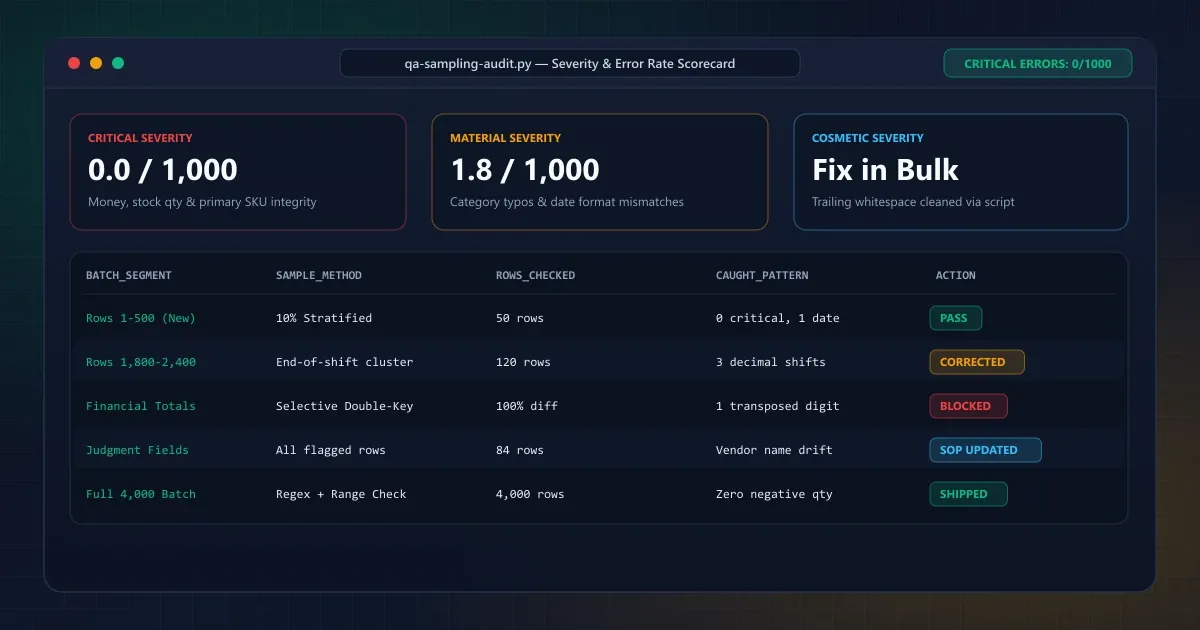
I use three severity levels and count them separately, because lumping them together hides the ones that matter.
| Severity | Definition | Example |
|---|---|---|
| Critical | Wrong in a way that affects money, stock, or the customer | Price off by a digit; wrong SKU attached |
| Material | Wrong in a way that breaks a process or a filter | Category misspelled so it does not group; date in the wrong format |
| Cosmetic | Wrong but nothing downstream changes | Double space in a description; inconsistent capitalisation |
Cosmetic errors are worth fixing in bulk with a script, not worth reviewing one at a time. Critical errors are worth a second pair of eyes every single time. Material errors sit in between and usually justify a rule rather than a review.
Once these are written down, "accuracy rate" has a specific meaning: critical errors per thousand rows, and material errors per thousand rows, reported separately.
Double-keying, used sparingly
Double entry means two people type the same data and a third step compares. It catches nearly everything and costs twice as much, which is why it should be applied selectively rather than everywhere.
I double-key when the data is financial and irreversible, when the volume is small enough that the cost is acceptable, or when onboarding a new person who has not yet built the habit of attention.
It is also useful as a calibration step: double-key 500 rows once, measure the disagreement rate, and that tells you what sampling rate you need for ongoing checks.
For high volume routine entry, double-keying everything is not economic. Sampling is.
Sampling that actually represents the work
Checking the first fifty rows is not sampling, it is checking the easiest part of the job. The first rows are fresh, the data is often cleaner, and the person is paying attention.
A useful sample is spread across the file and biased toward the difficult sections.
How much to sample
For a batch under five hundred rows, check ten percent chosen at random plus every row that involved a judgment call. For a batch over five thousand, five percent is enough to detect a systematic problem, though not to certify every row.
The purpose of sampling is not certification. It is detection. You are looking for evidence that the process broke, not proof that it did not.
Where to look first
Errors cluster. They are not evenly distributed through a file, because a file usually has sections of similar data and one section is harder than the others.
Prioritise rows where the source was ambiguous, where a field was blank in the original, where a value was outside the normal range, or where the operator left a note. Those are where mistakes live.
I also always check the last ten percent of a batch, because attention drops near the end.
The checklist itself
Run these in order. Each one takes seconds and each catches a different class of problem.
1. Row count reconciliation
Does the count of processed rows match the count of source rows? If you started with 4,000 and finished with 3,987, thirteen rows disappeared silently. That is a critical error at the batch level, regardless of what the rows contained.
2. Required field completeness
Filter every required column for blanks. This is faster than reading rows and catches omissions, which are the most common error type in high-volume work. Omission errors are also the easiest to fix because the blank announces itself.
3. Format conformance
Every date should match the expected pattern. Every price should be a number with two decimals. Every SKU should match the expected length and character set.
A pattern check catches typos that a human reading the row would miss because "SKU-1183" and "SKU-1188" both look plausible.
import re

DATE = re.compile(r'^\d{4}-\d{2}-\d{2}$')
PRICE = re.compile(r'^\d+\.\d{2}$')
SKU = re.compile(r'^[A-Z]{2,5}-\d{4}$')

def check_row(row):
    problems = []
    if not DATE.match(row['date']):
        problems.append('bad_date')
    if not PRICE.match(row['price']):
        problems.append('bad_price')
    if not SKU.match(row['sku']):
        problems.append('bad_sku')
    return problems
This is a completeness and shape check, not a correctness check. It tells you the value is well-formed, not that it is right. That is still worth a great deal, because a well-formed wrong value is at least consistent with everything else.
4. Range and plausibility
Set a plausible range per field. A quantity of 40,000 of a single SKU is probably a typo for 400 or 4,000. A price of 0.01 is probably a decimal-point error.
A date in 1970 is probably a default value that leaked in from an empty cell.
Range checks catch the errors that pass format checks and would otherwise look perfectly fine.
5. Duplicate detection
If a SKU should be unique, check that it is. Duplicates in a catalog cause the storefront to behave unpredictably at worst and confuse customers at best. In a transactional file, duplicates mean double posting.
6. Cross-field consistency
Some facts must agree. A shipping address in a country with no matching postcode format is suspicious. A subtotal larger than the total after tax is impossible. A discount exceeding the line value is a mistake.
Write down the three or four relationships that must hold in your data. They will catch real errors every single batch.
7. Read a random paragraph of source against output
After the automated checks, read ten rows of the source document against the corresponding output rows, character by character. Not fast, not clever, but it catches interpretation errors that no pattern check will find, because the output is well-formed and wrong.
Measuring your error rate
Once you sample, record what you find. Over a few batches you get a real number, and a real number changes behaviour because it can be compared.
batch_size         = 4000
sampled_rows       = 400
critical_errors    = 3
material_errors    = 11

critical_rate = critical_errors / sampled_rows * 1000
material_rate = material_errors / sampled_rows * 1000

print(f'critical: {critical_rate:.2f} per 1000 rows')
print(f'material: {material_rate:.2f} per 1000 rows')
print(f'estimated total critical errors: {critical_rate / 1000 * batch_size:.0f}')
Reporting per thousand rows is what makes batches comparable. "Three errors" means nothing without knowing whether the batch was four hundred rows or forty thousand.
The estimated total line is the one that gets attention. Three critical errors found in a sample implying twenty-eight in the batch is a more compelling number than any percentage.
Onboarding someone into an accurate workflow
A new person does not arrive with an error rate. They arrive with habits, and the first three weeks decide what those habits become. There are four things worth doing during that window that make a lasting difference.
Start them on double-keyed work. Their output gets compared against a second entry, so errors surface immediately and with a specific example attached. Feedback with an example is worth ten times feedback that says "be more careful."
Show them their own error list. Not the team's, theirs. After the first week, print the rows where they differed from the second entry and walk through them together.
Most people improve sharply after seeing their own pattern, because the mistakes are rarely random. One person transposes digits, another misreads handwritten quantities, a third rushes the last twenty rows of every batch.
Give them the validation script on day one. A person who can run the checker themselves before submitting catches their own errors and learns what the checker cares about. Withholding the tool so that a supervisor can run it afterwards wastes the feedback signal.
Let them tell you what is confusing. New people notice ambiguity that experienced people have stopped seeing. The single most valuable question to ask in week two is which parts of the source documents they had to guess at.
Those guesses become rules or format changes, and the rules make everybody's work easier.
When the team pushes back
Measurement makes some people uncomfortable, and the discomfort is worth addressing directly rather than working around. Typically it comes from one of two places, and they need different responses.
The first is fear that the numbers will be used as a stick. If the error rate is reported per person and used in performance conversations, people will under-report and the numbers become useless.
Report at the batch level and the process level. If a specific person needs coaching, that is a separate conversation with their own error list, not a monthly ranking.
The second is a belief that checking is a waste of time because the work is obviously correct. This is usually held by someone who is genuinely accurate and has never seen their own error rate.
Sampling their work for one batch and showing them a real example tends to settle the question faster than an argument.
If neither works, the honest fallback is that the sampling exists to protect the client, not to grade the team. A batch that goes out wrong costs more in rework and trust than the sample costs in time, and that is the entire justification.
Feeding findings back into the process
Measuring is only useful if it changes something. For each error type that appears repeatedly, choose one of three responses.
Add a validation rule. Best option when the error is detectable by rule. If three batches in a row had price typos, the range check catches them automatically from now on.
Change the input format. If dates keep arriving in inconsistent formats, fix the template so there is only one possible format. Most recurring errors are really format problems.
Change the process. If the errors cluster around a specific step, that step needs a second check or a different person. Errors that repeat in the same place are a process signal, not an individual failing.
The habits that reduce errors more than any checklist
Work in one window. Copying from a source document to a spreadsheet with three other tabs open invites mistakes. Close what you are not using.
Batch by type. Typing prices for two hundred rows, then quantities for two hundred, is faster and more accurate than doing row by row. Switching between field types costs attention.
Take the break. Error rates rise measurably after about ninety minutes of continuous entry. A ten-minute break costs less than the corrections.
Never work from a screenshot. The resolution and the inability to select text combination produces confident typos.
The one sentence version
"Check your work" is not a process. Sample a random ten percent, define errors in three severities, measure per thousand rows, and turn every repeated error type into either a rule or a format change.
That is the whole system, and it turns accuracy from something we hope for into something we know.
Sampling standards and related guides
The audit approach aligns with lot acceptance sampling principles in the NIST Engineering Statistics Handbook and regex validation patterns in the Python re documentation.
You can combine this checklist with our OCR invoice processing guide and spreadsheet validation guardrails.
Frequently Asked Questions
Common operational inquiries related to Data Entry Accuracy: A QA Checklist That Actually Catches Mistakes
Need Audited High-Volume Data Entry or Invoice QA Workflows?
Eliminate silent typos and spreadsheet bottlenecks. Schedule a free 15-minute call to review sampling rules, validation gates, and clean turnaround SLAs.

Written by Wp Hossain (Mikail Hossain)
Senior Catalog & E-Commerce Specialist with 7+ years handling multi-thousand-SKU WooCommerce, Shopify, and supplier CSV migrations (4.9/5 across 82 Fiverr reviews).