Tracking Billable Hours Without Lying to Yourself or Your Client
Most freelancers under-bill by 15 to 30 percent, not because they are bad at pricing, but because they never decided what counts as work. Here is the system that fixed that for me.

Virtual Assistant & Data Entry Specialist
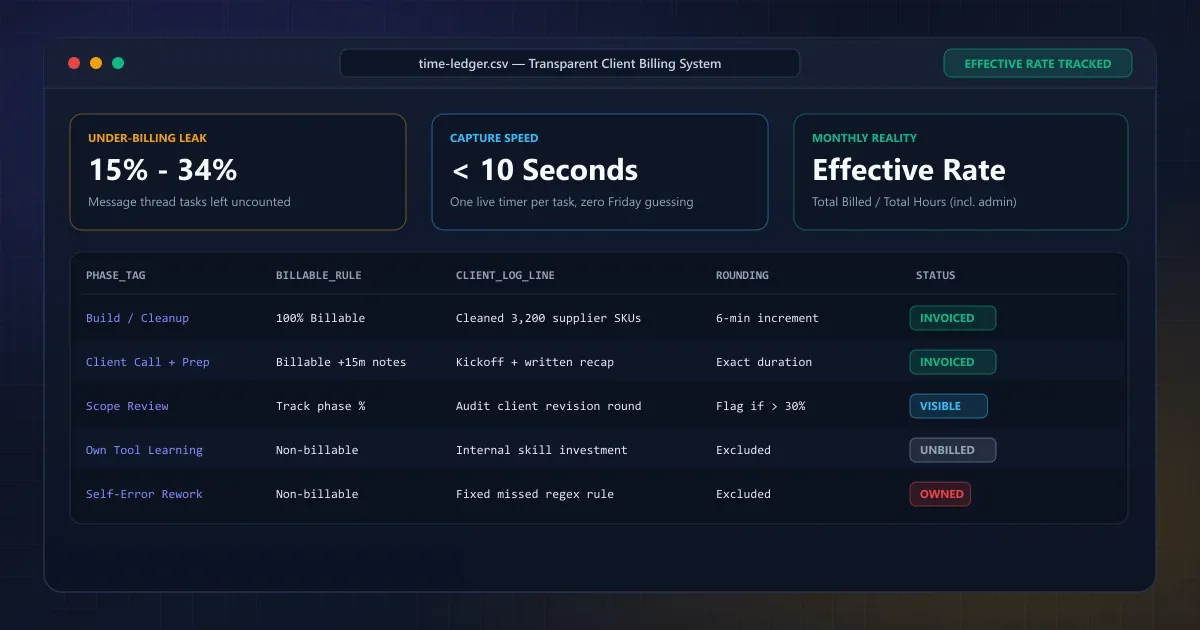
For my first two years freelancing I tracked nothing. I estimated, invoiced an estimate, and felt vaguely guilty about the difference.
When I finally installed a timer and ran it honestly for a month, the number that came back was uncomfortable: I was working about 34 percent more hours than I was billing.
Some of that was genuinely unbillable. Some of it was work I should have billed and never counted because it happened in a message thread instead of at my desk.
This is the system that came out of that month, and it has held up over several years of client work.
Decide what counts before you start the timer
The single biggest source of under-billing is not losing track of time. It is never having defined what counts.
If you decide per-task whether something was billable, you will decide in the client's favour almost every time, because saying "I'll include that" feels generous and costs nothing in the moment.
Write the rule down once, in your own contract, and apply it mechanically.
What I bill
Client-facing calls and meetings, including the ten minutes of prep and the fifteen minutes of notes afterwards. Research done for one client specifically. Revisions requested by the client. File organisation and delivery preparation. Anything that would not exist if the client did not exist.
What I do not bill
Learning a tool I will use across many clients. Admin for my own business, which includes invoicing them. Fixing my own errors. Informal check-ins where nothing is requested.
The last one has a boundary that takes judgement, because a casual message can contain a real request. My rule: if the reply requires work rather than information, it is a task, and tasks go in the tracker even if they arrive by chat.
The grey area, and how to handle it
Sending an invoice takes twelve minutes. Is it billable? I used to say no and now say yes, because it is work performed for that client that would not otherwise happen.
It is small, but four clients a month is three quarters of an hour, and that adds up over a year.
Whatever you decide, decide it once for all clients. Making the call per-client means the client who feels most demanding also gets the most free work, which is exactly backwards.
How to track without it becoming a chore
Tracking must take under ten seconds or you will not do it. That constraint rules out a lot of tools and a lot of elaborate setups.
Use a timer, not a timesheet filled in later
A timesheet completed on Friday is fiction with good intentions. Estimates of past time are wrong in a specific direction, and it is always the same direction. Start a timer when you start, stop it when you stop.
If a tool is unavailable, write the start time in a text file. Anything is better than reconstructing from memory at the end of the day.
One timer, one task
Multitasking while tracking produces a single number that means nothing. If you need to switch, stop and start. The stop/start moment is also where you notice that you are switching five times in an hour, which is information worth having.
Tag lightly
Two dimensions are enough: client, and phase (research, build, review, communication). More tags means more decisions per entry, which means fewer entries.
The phase data is more useful than people expect. After two months you can see that a client who pays for build work is spending forty percent of their hours in review, which is a scoping conversation worth having.
Do not track by asking permission
Some clients ask for hours before approving. That changes what you bill, not what you track. Track everything, then map it onto the agreement.
If the agreement is a fixed number of hours, the tracking tells you whether you are inside it before it becomes a problem.
Rounding, and the ethics of it
Rounding is normal and every freelancer does it. The question is which direction and by how much.
I round to the nearest six minutes, which is a tenth of an hour. That is granular enough to be roughly accurate and coarse enough not to pretend that a timer measures attention precisely.
What I do not do is round up systematically. Rounding every fourteen-minute call to fifteen makes the numbers look clean and inflates the total by a few percent per entry. A client who examines the log will notice that nothing ever took eight minutes.
Round neutrally: 7 minutes becomes 6, 8 becomes 12 if you are using ten-minute blocks, and anything under 3 minutes gets bundled into the next entry rather than logged separately. Bundling is honest and it cuts the entry count, which keeps the log readable.
Presenting hours so nobody argues
A number with no detail invites a conversation about whether it is real. A number with categories attached invites a conversation about scope, which is a better conversation.
| What to include | Why |
|---|---|
| Date and duration per entry | Lets them spot anything they did not expect |
| Short task description | Turns numbers into a record of what was done |
| Phase grouping | Shows where the effort actually went |
| Total and the rate | Removes arithmetic from the conversation |
One line per task, not per keystroke. "2026-12-03 — 1.4h — Catalog cleanup, 340 rows sanitized and uploaded" is a useful entry. A log of forty entries at four minutes each is noise that makes the invoice suspicious rather than transparent.
Add two sentences at the top
Before the table, write two sentences describing what was accomplished in the period. Not what hours were spent, what was done. Clients read the narrative and skim the hours, and the narrative sets the frame for the skim.
When the total is higher than expected
Say so before they ask. A short note: "This month came in higher than usual because the supplier changed their file format mid-month, which required reworking the import. Detail below if useful."
Surfacing it first turns a potential dispute into a conversation about the cause, and it keeps the relationship on the side of the work rather than the money.
Reviewing your own numbers monthly
Once a month, look at three derived figures. They take five minutes and they change how you quote future work.
Effective hourly rate
Total billed divided by total hours worked, including the unbillable ones.
If your rate is 40 an hour and your effective rate is 26, you are not earning 40 an hour. Knowing that is the difference between a sustainable business and a busy one.
Phase mix
What percentage of hours went to billable production versus communication and admin. For most freelancers the communication share rises as clients become more established, because established clients send more messages.
If it crosses about 25 percent, worth either pricing it in or setting expectations about response times.
Rework share
Hours spent redoing something already done. If this is above 10 percent, the cause is usually a missing specification at the start rather than a slow worker. Two lines of clarification before starting usually prevents a rework cycle that costs an hour.
The mistakes that cost the most
Not tracking small tasks. Eleven seven-minute jobs is over an hour. These disappear from memory entirely and are the main reason people under-bill without feeling like they are under-billing.
Tracking, then not billing. Collecting accurate hours and then invoicing a round number "to be nice" wastes the entire exercise. If the agreement is hourly, bill the hours.
Not tracking at all in busy periods. The busiest months are exactly when tracking matters most, and exactly when the habit breaks. A text file with start times is enough to survive those weeks.
Sharing raw logs. A client does not want to know that you took a two-minute break between tasks. Send the summary at task level. The raw timer data is for you.
Tools, and why the simple ones win
I have used purpose-built time trackers, spreadsheet timers, and a plain text file, and the difference in accuracy came down almost entirely to how many clicks it took to start tracking.
A tracker that needs you to pick a project, select a task, add a note, and then press start will not get used during a busy day.
A tracker with one button that starts a generic timer, and where you categorise afterwards, survives contact with reality.
My current setup is deliberately dull. One timer running at all times, each entry tagged with client and phase when the timer stops, and a weekly export to a spreadsheet.
The spreadsheet is where the monthly review happens, because a pivot table answers the effective rate question faster than any dashboard.
If you bill multiple clients, keep the entries separate from the start. Retrofitting a client tag onto a week of untagged entries is one of those tasks that never actually gets done.
The minimum viable version
If you take nothing else: write down what counts and what does not, use a timer for every task, review your effective rate once a month.
That is roughly ten minutes of overhead a week, and for me it recovered about 34 percent of my working time. Hard to imagine a better return on ten minutes.
Recordkeeping standards and related guides
Clean time logs also strengthen tax and audit readiness under IRS small business recordkeeping rules and SBA financial management guidance.
Combine disciplined hour logs with our client onboarding playbook and clear delegation rules.
Frequently Asked Questions
Common operational inquiries related to Tracking Billable Hours Without Lying to Yourself or Your Client
Ready to Delegate Catalog, Spreadsheet & Admin Workflows Safely?
Onboard a specialist VA who writes clean SOPs, scopes access properly, and tracks hours transparently. Book a free 15-minute discovery call to start.

Written by Wp Hossain (Mikail Hossain)
Senior Catalog & E-Commerce Specialist with 7+ years handling multi-thousand-SKU WooCommerce, Shopify, and supplier CSV migrations (4.9/5 across 82 Fiverr reviews).