CSV Templates for Small Business: Inventory, Sales & Customer Files That Don't Break
Most small business CSV problems are not technical. They are a missing column header, a date format nobody agreed on, and an Excel round trip that quietly turned SKU 00412 into 412. Here are templates that avoid all three.

Virtual Assistant & Data Entry Specialist
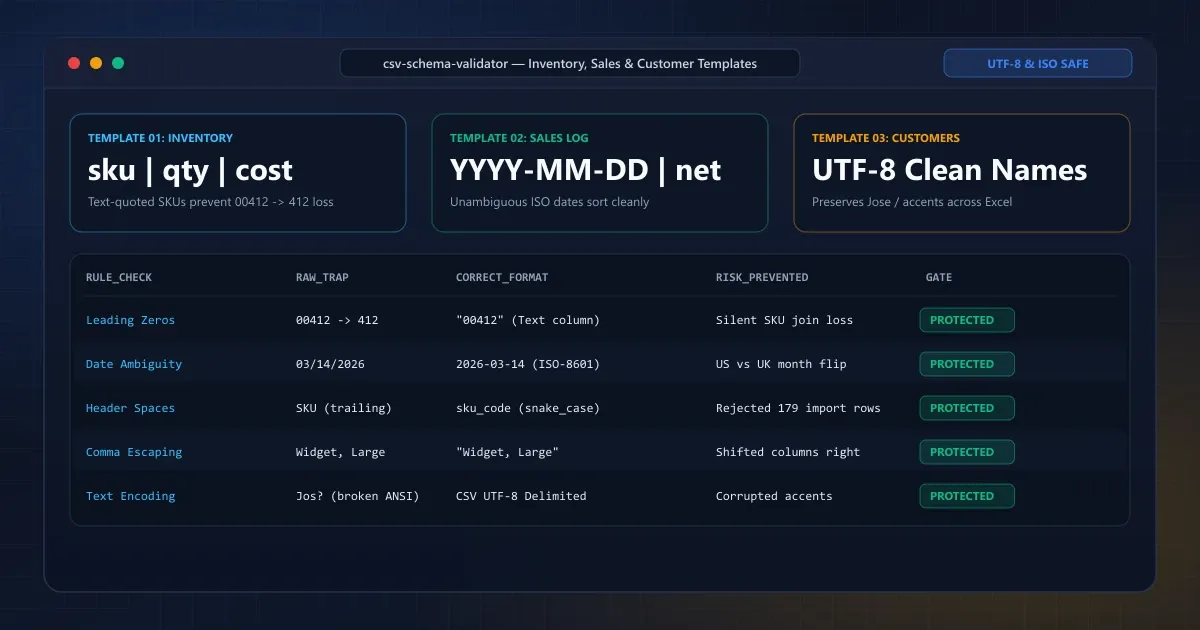
A florist I worked with last year lost an entire Saturday to a supplier import. Her order file had 240 rows and the system accepted 61 of them. The other 179 were rejected with an error message that said "invalid data" and nothing else.
The problem was not her data. It was a single header cell that read SKU with a trailing space. The import matched on exact header names, so every row with a SKU was treated as missing that field.
That is the shape of most small business CSV trouble. Not exotic. Not technical. Just one small mismatch between what a human sees and what a machine reads.
This guide gives you three templates that avoid the recurring failures, plus the rules that matter regardless of which template you use. Every rule here came from an import that broke at least once.
Why CSV is still the right format
Every few years somebody announces that CSV is dead. It is not, and for small business it is not even close. CSV opens in every spreadsheet application, every accounting tool imports it, and it is readable twenty years later without special software.
The trade-off is that CSV stores no formatting and no types. Everything is text. That is exactly why it is portable, and exactly why it is easy to break.
Since you cannot store "this column is a date," you have to store dates in a format that cannot be misread. That single decision prevents more problems than any other.
The rules that apply to every CSV you make
Save as UTF-8, and be specific about it
Excel on Windows will save CSV as ANSI by default in some versions, which mangles any non-English character. A customer named José becomes José. An apostrophe in a brand name becomes a question mark.
Save as "CSV UTF-8 (Comma delimited)" from Excel's save dialog. If your tool offers a BOM option, take it for files destined for Excel, and leave it off for files destined for a database or a script.
ISO dates, always
2026-03-14 is unambiguous. 03/14/2026 is March in the US and invalid or misread elsewhere. 14/03/2026 is March in most of the world and rejected in the US.
ISO format also sorts correctly as plain text, which means you do not need date parsing to sort a report. That is a small convenience you will appreciate every month.
Protect leading zeros
SKU 00412 becomes 412 the moment a spreadsheet opens the file, unless the column is explicitly text. Then your inventory count joins fail silently because the catalog has 00412 and the count file has 412.
Two defenses. In your template, format the column as Text before pasting data. When creating a CSV programmatically, quote the value: "00412". Quoting signals text and most importers respect it.
Quote anything containing a comma
A product name like "Widget, Large, Red" will split into three columns unless it is quoted. Wrap the value in double quotes and escape any internal quotes by doubling them.
"Widget, Large, Red"
"She said ""that's fine"" in the notes"
If you are exporting from a spreadsheet this happens automatically. If you are building a file by hand or with a script, it is easy to forget, and the resulting file looks correct until someone opens it.
No empty headers, no duplicate headers
An empty header cell can shift every column after it. Two columns named price means the importer picks one, and you will not know which.
Header names should be lowercase with underscores, and should not contain spaces or punctuation. unit_price is safe. Unit Price ($) is not.
Strip whitespace from every cell
This is the florist's bug. Trailing and leading spaces are invisible in a spreadsheet and fatal to exact-match imports. Most tools have a trim function; use it on the whole sheet before exporting.
Non-breaking spaces are worse, because trim functions often miss them. They arrive when someone copies a value from a web page. If a match fails and the values look identical, this is the first thing to check.
Template 1: Inventory file
This is the workhorse. One row per SKU, one column per fact you need to track, nothing computed that could drift.
| Column | Type | Example |
|---|---|---|
sku | Text | "00412" |
product_name | Text | "Ceramic Mug, 350ml" |
variant | Text | "Sage Green" |
unit_cost | Number, 2dp | 3.40 |
unit_price | Number, 2dp | 12.00 |
qty_on_hand | Integer | 48 |
reorder_point | Integer | 20 |
supplier | Text | "Northfield Ceramics" |
last_counted | ISO date | 2026-11-20 |
The reorder_point column is the one people leave out and later wish they had. Without it, low-stock alerts depend on someone remembering a number from a conversation.
The last_counted column exists because inventory files drift. Without a count date you cannot tell whether a quantity is current or six months stale, and stale is the default.
Do not put formulas in a CSV
A CSV cannot store a formula. If your spreadsheet has a computed column like =E2*F2, the CSV will contain the last calculated value, frozen. Reopen it and change a cost, and the total does not update. It looks live and it is not.
Keep computed values in the master spreadsheet and export only raw inputs. The next person to open the CSV then knows exactly what they are looking at: inputs, not results.
Template 2: Sales tracking file
If you sell through more than one channel, a unified sales file is what makes monthly reporting possible.
| Column | Notes |
|---|---|
order_id | Text, prefixed by channel if IDs can collide |
channel | store, market, platform name |
order_date | ISO date, store local time |
sku | Text, matches inventory |
qty | Integer |
unit_price | Number, before discount |
discount | Number, positive value representing money off |
shipping_charged | Number |
tax_collected | Number |
refunded | Number, 0 if none |
status | completed, processing, cancelled |
Store discount as a positive number and subtract it. Using negative numbers for discounts seems elegant and causes sign errors in every downstream calculation, especially averages.
Keep refunded in the same file rather than a separate refunds file. It is one row per order line, and having the refund next to the sale means a single filter can produce net revenue.
Template 3: Customer list
This one has privacy and legal weight that the other two do not. If you are in the EU or selling to EU customers, personal data needs a lawful basis and a retention policy. Keep the file minimal for that reason.
| Column | Notes |
|---|---|
customer_id | Your own ID, not an email |
email | Lowercase, trimmed |
display_name | As the customer entered it |
country | ISO 3166-1 alpha-2, e.g. GB |
first_order_date | ISO date |
total_orders | Integer |
lifetime_value | Number |
marketing_consent | yes / no / unknown |
consent_date | ISO date, blank if none |
The marketing_consent column should have a third value, "unknown," rather than defaulting blanks to "no." Unknown and no are different facts and conflating them loses information you may need later.
A blank cell imported into a strict boolean column is also a common source of failed imports.
Do not store addresses, phone numbers, or birth dates unless you have a specific operational reason. Every extra field is a liability with no compensating benefit.
The Excel round trip that ruins files
Here is a sequence that has burned almost everyone once.
You export a CSV. You open it in Excel to look at it. You save it. Now: leading zeros are gone, long numbers are in scientific notation, dates have been reformatted to your locale, and the encoding may have changed.
The file you saved is not the file you exported, and nothing warned you.
Two ways around it. Use Data → From Text/CSV instead of double-clicking the file, which opens an import wizard where you set each column to Text and choose UTF-8.
Or do your inspection in a tool that does not reinterpret data, including a plain text editor or a spreadsheet you have configured to treat everything as text.
If you must double-click, at least diff the file before and after. A single changed cell in the first row is enough to tell you something was reinterpreted.
A two-minute validation pass
Before any import, run four checks. They catch nearly everything.
Row count. Does the file have the number of rows you expect? An off-by-one usually means a header row was consumed as data.
Column count. Is it consistent across rows? A row with an extra comma creates a ragged file, and many importers silently pad or truncate it.
Empty required cells. Filter each required column for blanks. This is faster than reading 400 rows.
Date and number spot checks. Sort by date and look at the first and last five rows. If a stray value sorts to the top or bottom, it is malformed.
import csv
from collections import Counter

with open('inventory.csv', newline='', encoding='utf-8') as fh:
    rows = list(csv.DictReader(fh))

widths = Counter(len(r) for r in rows)
print('row widths:', dict(widths))
print('missing sku:', sum(1 for r in rows if not (r.get('sku') or '').strip()))
print('total rows:', len(rows))
If the widths dictionary has more than one key, your file is ragged and needs fixing before import. That one check has caught more broken files for me than any other.
File naming for future you
Name exports with the content and the date: inventory_2026-11-25.csv. Not export.csv, not final_v2_USE_THIS.csv.
Six months from now, when someone asks what inventory looked like before the stocktake, the date in the filename is the entire answer. A folder of files called export with numbers appended is a folder you will rebuild from scratch.
When CSV is the wrong choice
If you need formatting, multiple sheets, or formulas that stay live, use XLSX. If the data is nested, use JSON. If two people need to edit simultaneously, use a shared spreadsheet or a proper database.
CSV is for exchange and archive. Treat it that way and it behaves well. Treat it as a working document and it will quietly lose your leading zeros.
The short version
Use UTF-8. Use ISO dates. Quote anything with a comma. Store SKUs as text. Never save a CSV from a spreadsheet without checking what changed. Run the row-width check before importing.
That is the whole list. It is not sophisticated, and it prevents about 90 percent of the failures I get called about.
Format standards and related guides
Strict CSV quoting rules follow the IETF RFC 4180 CSV specification, while unambiguous dates follow the ISO 8601 date format (YYYY-MM-DD).
If you automate imports with scripts, see the Python csv module documentation, plus our guides on Excel Data Validation error-proofing and cleaning WooCommerce CSV exports.
Frequently Asked Questions
Common operational inquiries related to CSV Templates for Small Business: Inventory, Sales & Customer Files That Don't Break
Need High-Volume WooCommerce or Shopify Catalog Migration?
Eliminate broken variation CSVs and mismatched attributes. Schedule a free 15-minute call to review SKU counts, taxonomy structure, and bulk import timelines.

Written by Wp Hossain (Mikail Hossain)
Senior Catalog & E-Commerce Specialist with 7+ years handling multi-thousand-SKU WooCommerce, Shopify, and supplier CSV migrations (4.9/5 across 82 Fiverr reviews).