eBay Inventory Management for Multi-Channel Sellers: Keeping Stock Honest
Overselling on eBay is not a stock problem, it is a timing problem. Here is how multi-channel sellers keep quantities honest across eBay, their own store, and marketplaces without cancelling orders.

Virtual Assistant & Data Entry Specialist
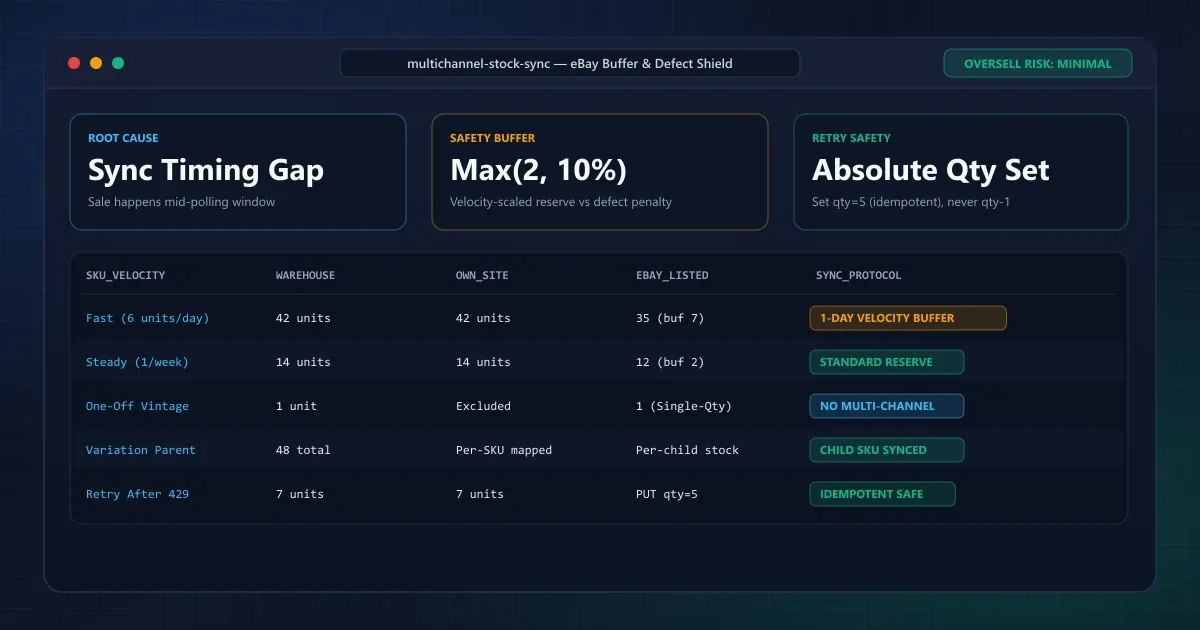
eBay punishes cancelled orders more than almost anything else. A cancellation because you sold something you did not have counts as a defect, defects affect your seller standing, and seller standing affects how high you appear in search.
One oversell costs more than the margin on twenty good sales.
Which is why multi-channel inventory management is not an admin task. It is the core of the operation.
Here is how I structure it, having watched it go wrong in every way available.
The real problem is timing, not counting
Most sellers assume their inventory problem is accuracy. It usually is not. The count in the spreadsheet is roughly right.
The problem is that between the moment a buyer on eBay clicks buy and the moment your listing quantity updates, your own store may have sold the same unit.
That window is the oversell window, and its length determines your risk. On a manual workflow the window is measured in hours. On a well-built sync it is under a minute.
Everything below is about shortening that window and building a cushion for when it fails.
Choose the listing format deliberately
eBay gives you two fundamentally different tools and they behave differently under multi-channel selling.
| Format | Behaviour | Best for |
|---|---|---|
| Fixed price, quantity based | You state a quantity; it decrements per sale | Repeatable stock, catalogue items |
| Fixed price, single quantity | Listing ends when sold | One-off items, unique pieces |
| Auction | Ends at a time; one winner | Genuinely scarce items, not regular stock |
For anything you hold in multiples, quantity-based fixed price is the only format that behaves well with a sync. A single-quantity listing has to be relisted after every sale, which creates a different listing each time, which fragments your history and your search performance.
For genuinely one-off items, single quantity is correct and you should treat them as a separate workflow that does not attempt sync.
The safety buffer, and why everyone needs one
If you have eight units and you list eight everywhere, you will oversell. Not because the sync is broken but because networks fail, API calls rate limit, and a sale can land while a sync job is between retries.
The standard fix is to list less than you have. Hold back a buffer on each channel.
As a starting point: hold back two units or ten percent, whichever is larger, on channels that update slower. On the channel that is your source of truth, list the full quantity.
This feels like leaving money on the table and it is. It is also the cheapest insurance available.
A buffer of two units per SKU on a catalogue of 400 SKUs hides 800 units, which sounds alarming until you compare it to the cost of a defect rate that suppresses your listings.
Adjusting the buffer by velocity
Fast movers need a bigger buffer because more sales happen inside the sync window. Slow movers need almost none. Measure your daily units sold per SKU for a month and set the buffer at roughly one day's worth plus one unit.
An SKU selling six a day needs a buffer of seven. An SKU selling once a month needs two. Applying a single number across a catalogue either over-protects the slow movers or under-protects the fast ones.
Bulk edit without breaking things
eBay's bulk edit tool is powerful and unforgiving. The standard mistake is applying a change to everything because the filter was not narrow enough.
Filter, then verify the count, then edit
Before any bulk change, apply the filter and read the number of matching listings. If you expected 40 and it says 412, stop. That number is the last cheap checkpoint you get.
Then apply the change to a small slice first. Ten listings. Look at them on the live site. Only then apply to the rest.
Use the bulk upload spreadsheet for anything structural
For category changes, item specifics, or large quantity updates, the file-based bulk upload is safer than the interface because you can review the file before it goes. You can also keep it as a record of what you changed.
Two things to know about the file. Required columns vary by category, so download a fresh template from eBay rather than reusing an old one.
And a wrong value in a required column fails that row silently in some versions, so always check the processing report afterwards rather than assuming success.
Item specifics are inventory data, not decoration
eBay's item specifics, the structured fields like brand, size, colour, and type, affect whether your listing appears in filtered searches. A listing missing them is invisible to anyone using filters, which is most buyers.
Treat them as required fields in your inventory file. Add columns for each specific that matters in your category, and fill them at upload time. Backfilling later means editing hundreds of listings individually, which nobody does.
Building the sync so it holds up
Whether you use a third-party tool or your own script, the same rules apply. These are the ones that matter.
One source of truth
Pick one system that owns the quantity and have every other channel read from it. If two systems both write, you get conflicting numbers and no way to know which is right.
In most small operations the source of truth should be your own store or your warehouse file, never a marketplace.
Push on change, poll as a backstop
The fast path is event-driven: the moment a sale happens, push the new quantity to every channel. The slow path is a periodic poll that reconciles everything every fifteen or thirty minutes regardless.
You need both. Events get lost, webhooks fail, and a poll is what catches the drift before it becomes a cancellation.
Make updates idempotent
Sending the same quantity twice must not cause a problem. If your sync decrements rather than setting an absolute value, a retried request double-decrements. Send the absolute quantity, not a delta.
# Wrong: a retry double-decrements
update_quantity(sku, current - 1)

# Right: a retry is harmless
update_quantity(sku, new_absolute_quantity)
Log every sync failure and alert on it
A sync that fails silently is worse than no sync, because you believe the numbers are current. Log every failed call with the SKU and the reason, and alert when failures exceed a threshold in any hour.
One failed call is noise; forty in an hour means the connection is down and you are now overselling.
When you do oversell
It happens. The response matters more than the event.
Message the buyer before eBay does anything. Say plainly that the item is unavailable, apologise without a long explanation, and cancel from your side rather than waiting for them to open a case.
Buyers who are told first react very differently from buyers who discover it.
Then find the cause. Pull the timestamps: when did the other channel sell it, when did the sync fire, when did the listing update. In almost every case there is a several-minute gap that explains it, and that gap is what you fix.
Catalogue hygiene that prevents surprises
Retire listings properly. Ending a listing is not the same as deleting it. Ended listings keep their history, which is useful, but they also accumulate. Review quarterly and end anything that has not sold in a year.
Watch the out-of-stock setting. eBay has a setting for what happens when quantity hits zero. Make sure it does what you expect rather than what the default does.
Keep a plain-file backup of your live listings. SKU, title, quantity, price, category, item specifics. If a bulk edit goes wrong, this file is how you reconstruct what was there. It takes twenty minutes to export and it has saved me twice.
Variations, and the quantity trap they hide
A listing with variations, size and colour for instance, can carry a quantity per variation.
That is useful and it is also where sync tools most often go wrong, because some of them treat the listing as a single unit and push one number to it.
If you sell variations, confirm explicitly that your sync supports per-variation quantities. Then test it: set three sizes to different quantities, sell one of the middle size, and check that only that variation moved.
The failure mode is quiet. A sync that pushes a total quantity to a variation listing leaves the listing live with stock that is distributed across the wrong sizes.
You will sell out of one size while the listing still shows availability, and the cancellation that follows is the expensive kind.
The two numbers worth watching weekly
Out-of-stock rate on active listings. If a meaningful share of your listings show zero quantity, you are paying insertion fees for listings that cannot sell, and your search placement suffers. Either restock or end them.
Sync failure count. Covered above, but worth restating as a weekly number rather than a live alert. A failure rate that creeps up over a month usually means an API limit changed or a token is close to expiring.
Both numbers take a minute to produce from your own logs. Neither appears in eBay's seller dashboard in a form that tells you what to do.
The one-line version
One source of truth, a buffer against the sync window, absolute quantity updates rather than deltas, and alerts when sync fails.
None of it is clever. All of it is the difference between a seller who cancels occasionally and one who never does.
eBay standards and multi-channel guides
Monitor defect thresholds under eBay Seller Standards, review multi-variation listing rules, and inspect the eBay Inventory API overview.
For cross-store sync architectures, read our multi-supplier inventory feed guide and Amazon and eBay feed sanitization playbook.
Frequently Asked Questions
Common operational inquiries related to eBay Inventory Management for Multi-Channel Sellers: Keeping Stock Honest
Need High-Volume WooCommerce or Shopify Catalog Migration?
Eliminate broken variation CSVs and mismatched attributes. Schedule a free 15-minute call to review SKU counts, taxonomy structure, and bulk import timelines.

Written by Wp Hossain (Mikail Hossain)
Senior Catalog & E-Commerce Specialist with 7+ years handling multi-thousand-SKU WooCommerce, Shopify, and supplier CSV migrations (4.9/5 across 82 Fiverr reviews).